NAP consistency for local businesses: a practical guide


NAP consistency means your business name, address, and phone number appear identically everywhere a customer or search engine might find you. The single most important thing you can do right now: choose one canonical NAP and publish it in your website footer and your Google Business Profile. Do that before anything else.
Your canonical NAP is the master record everything else must match. For example:
- Name: Maple Ridge Plumbing Inc. (not “Maple Ridge Plumbing” on one site and “MR Plumbing” on another)
- Address: 145 King Street West, Suite 300, Toronto, ON M5H 1J8 (not “145 King St W #300” on Yelp and “145 King Street, Toronto” on YellowPages Canada)
- Phone: (416) 555-0192 (not a tracking number, not a toll-free variant)
Once that record exists, every directory, from Yelp Canada to YellowPages Canada, must mirror it exactly. As Ahrefs explains, accurate and consistent NAP information directly improves local visibility, and Google Business Profile is where that accuracy matters most.
Pro Tip: Lock your canonical NAP into your sitewide footer and add an Organization or LocalBusiness schema block to your homepage. Search engines read that structured data as your authoritative self-declaration.
One quick note on terminology: when you see “nap consistency” in a search result, it sometimes refers to infant sleep schedules or daytime rest habits. In local SEO, NAP is always capitalised and always means Name, Address, Phone. Keep that distinction in mind when briefing a team member or running keyword research.
Key takeaways
Consistent NAP across every Canadian directory is the single most controllable local SEO factor you have, and fixing it takes less than a week for most single-location businesses.
| Point | Details |
|---|---|
| Choose a canonical NAP first | Write one exact name, address, and phone record before touching any directory. |
| Website and GBP are highest priority | Fix your footer, contact page, and schema first; then correct Google Business Profile within the same day. |
| Top 10 directories take 1–3 days | Claim and correct Yelp Canada, YellowPages Canada, 411.ca, Bing Places, and Foursquare manually. |
| Quarterly audits prevent drift | A 30-minute scan every three months catches new duplicates and post-move errors before they compound. |
| Tech Business Development | Offers NAP audits, GBP setup, schema implementation, and ongoing local SEO management for Canadian businesses. |
Table of Contents
- Where does your NAP appear online?
- Why NAP consistency matters for local search
- How consistent does your NAP actually need to be?
- Common reasons NAP becomes inconsistent
- How to audit your NAP consistency
- How to fix and maintain your NAP
- Tools and services that manage your NAP
- Your NAP audit checklist
- A perspective on keeping NAP manageable
- How Tech Business Development can help with your NAP and local SEO
- Sources
Where does your NAP appear online?
A citation is any online mention of your business that includes at least your name and one other contact detail. The full inventory is longer than most business owners expect.
Structured citations (where the directory has dedicated fields for name, address, and phone):
- Your own website: homepage, contact page, footer, and any location-specific landing pages
- Google Business Profile
- Bing Places for Business
- Apple Maps (fed partly by Yelp and other aggregators)
- Yelp Canada
- YellowPages Canada
- 411.ca
- Foursquare (which feeds dozens of downstream apps and GPS systems)
- Industry-specific directories (e.g., HomeStars for trades, RateMDs for health)
- Local Chamber of Commerce listings
Unstructured citations appear in blog posts, news articles, and partner pages where your name and address are mentioned in running text rather than form fields. Search engines read both types.
Your website is also a citation source in a technical sense. The schema.org/LocalBusiness markup you add to your site tells search engines your canonical NAP directly, in machine-readable format. As AIOSEO notes, some practitioners extend NAP to include email address and website URL as related contact fields worth monitoring.
A practical example of how variations creep in: your original listing on 411.ca might read “Suite 300,” while a scraped copy on a local news site reads “#300,” and your own contact page says nothing at all. All three refer to the same office. To a human, it’s obvious. To a search engine cross-referencing dozens of signals, it introduces doubt.
Why NAP consistency matters for local search
Consistent NAP improves search engines’ confidence that your business is legitimate, active, and located where you say it is. Fractured citations, where your name appears in five slightly different forms across twenty directories, dilute that signal and can suppress your visibility in the local map pack.
Moz’s local SEO guidance explains that Google scans directories and citations as prominence signals. When the records agree, Google can confidently surface your business. When they conflict, it may rank a competitor whose data is cleaner.
Statistic: A BrightEdge industry analysis referencing research by Wesley Young suggested NAP consistency can influence local search performance by a significant margin in certain comparisons. That is not a trivial share of ranking signal for a factor you can control entirely.
The customer-experience cost is just as real. A wrong phone number means a lost call. An outdated address sends someone to your old location. A misspelled business name makes your Google reviews harder to find. Each of these failures happens silently, and you rarely hear about it.
Metrics worth tracking once you start fixing NAP:
- Google Business Profile impressions (search and maps)
- Calls from GBP
- Driving directions requests
- Website visits from local search
- Yelp and YellowPages page views
How consistent does your NAP actually need to be?
Small formatting differences that convey the same information are generally fine. Conflicting content, a different street name, a different phone number, a different business name, is not.
Acceptable variations:
- “Street” vs. “St.” (same address, different abbreviation)
- “(416) 555-0192” vs. “416-555-0192” (same number, different punctuation)
- Omitting “Inc.” on informal social profiles
- Suite number formatted as “Suite 300” vs. “#300” vs. “Ste. 300”
Harmful differences:
- “123 Main Street” on your website and “456 Queen Avenue” on an old Yelp listing (leftover from a move)
- A call-tracking number published on YellowPages instead of your real business line
- “Maple Ridge Plumbing” vs. “Maple Ridge Plumbing & Heating” when the trade name has changed
- A toll-free number on one directory and a local number on another, with no consistency
Call tracking deserves special attention. Dynamic Number Insertion (DNI) swaps your phone number on your website for a tracking number that only visitors see, while the underlying page code still contains your real NAP. That approach is safe. What breaks consistency is publishing a tracking number directly in a directory listing or leaving an old tracking number live on a citation after a campaign ends. Keep tracking numbers out of public citations entirely.
Pro Tip: Create a one-page “canonical NAP guide” document and share it with anyone who touches your listings: your web developer, your marketing coordinator, your franchise head office. It should specify the exact business name string, the full formatted address, the primary phone number, and the preferred phone format for international display (e.g., +1 416-555-0192 for your website header vs. (416) 555-0192 for directory fields).
Common reasons NAP becomes inconsistent
Most NAP problems fall into a handful of repeating patterns. Knowing which one applies to your business tells you where to focus first.

Duplicate listings are the most common issue. A business claims a Google Business Profile, but an older auto-generated listing still exists with a slightly different name. Both appear in search results, splitting reviews and confusing Google.
Old addresses linger after a move. The business updated its website and GBP but forgot 411.ca, Foursquare, and three industry directories. Customers following GPS directions still arrive at the old location.
Multiple phone numbers accumulate over time: the original landline, a newer VoIP number, a temporary call-tracking number from a past campaign. Each one appears on a different platform.
Franchisor vs. local entries create a specific headache for franchise operators. The head office may have claimed a national listing for your location with their corporate phone number, while you have a separate local listing with your direct line. Both rank, neither is complete.
Scraped and copycat listings appear when aggregators pull data from other directories without your input. The scraped version may be months or years out of date.
As this practical overview of NAP consistency confirms, claiming and standardising listings across major directories is the fastest way to reduce citation fragmentation.
How to audit your NAP consistency
Run a two-phase audit: first, lock down your canonical NAP; second, discover every citation and compare it against that master record.
Phase A: Establish your canonical NAP
- Confirm your legal or trade name as it should appear publicly.
- Format your address to Canada Post standards (unit number before street number for suite-style addresses, province abbreviation, postal code).
- Choose your primary local phone number (not a tracking number).
- Write it all in a document and share it with your team.
Phase B: Discover and log every citation
- Search Google for your exact business name in quotes, then your phone number in quotes.
- Check your website: footer, contact page, and any location pages.
- Export your Google Business Profile info and confirm every field.
- Visit Yelp Canada, YellowPages Canada, 411.ca, Bing Places, and Foursquare manually.
- Search for fuzzy name variants (abbreviations, missing “Inc.”, old trade names).
- Run a paid scan with a tool like BrightLocal or Whitespark if you want broader coverage.
Audit spreadsheet columns to capture:
- Source (directory name and URL)
- Listed name
- Listed address
- Listed phone
- Match status (exact / minor variation / conflict)
- Claimed? (yes / no)
- Notes / action required
Sample citation log:
| Source | Listed name | Listed phone | Match status |
|---|---|---|---|
| Yelp Canada | Maple Ridge Plumbing | (416) 555-0192 | Exact |
| 411.ca | MR Plumbing Inc. | 416-555-0192 | Name conflict |
Manual vs. tool-assisted audit:
| Method | Canadian directory reach | Speed | Cost | Best for |
|---|---|---|---|---|
| Manual checks | Core 6–8 directories | Slow (2–4 hours) | Free | Single location, tight budget |
| BrightLocal scan | Top directories, Canadian coverage | Fast (minutes) | Paid subscription | Single or multi-location |
| Whitespark citation finder | Strong Canadian focus | Moderate | Paid per search | Canadian businesses needing depth |
| Yext sync | Major platforms, some Canadian gaps | Automated | Higher cost | Multi-location, enterprise |
How to fix and maintain your NAP
Start with your website. It is the one property you fully control, and search engines treat it as your authoritative self-declaration.
Website fixes (1–2 hours):
- Update the footer with the canonical NAP on every page.
- Update the contact page with full address, phone, and a Google Maps embed.
- Add or correct
LocalBusinessschema markup. At minimum, includename,address,telephone, andurlfields.
Google Business Profile (30–60 minutes):
- Log in, verify ownership, and check every field: name, address, phone, website, hours, and category.
- Remove or merge any duplicate GBP listings you find.
Top 10 directories (1–3 days):
- Claim your listings on Yelp Canada, YellowPages Canada, 411.ca, Bing Places, and Foursquare.
- Edit each one to match your canonical NAP exactly.
- Take a screenshot of each corrected listing with a timestamp.
Long-tail and aggregator directories (1–4 weeks):
- Use BrightLocal, Whitespark, or Moz Local to identify and correct lower-priority citations.
- Submit corrections to data aggregators that feed GPS and voice search systems.
For call tracking, use DNI on your website only. Your tracking platform swaps the number in the browser; the underlying HTML and schema still carry your real number. Never publish a tracking number in a directory field.
Pro Tip: Set a quarterly calendar reminder to re-run your audit. Business moves, phone changes, and new scraped listings appear without warning. A 30-minute quarterly check catches problems before they compound.
Correcting entries at hubs like Google and major directories reduces downstream inconsistencies faster than editing isolated sites one by one, because those hubs syndicate data to aggregators and GPS platforms automatically.
Tools and services that manage your NAP
The right tool depends on how many locations you have and how much time you want to spend.
When to use a tool vs. hire an agency: A single-location business can fix the most impactful listings manually within a few days using the checklist above. Multi-location businesses, or any business that has moved or rebranded, benefit from a sync platform or managed service to avoid missing dozens of downstream citations.
Platforms to know:
- Google Business Profile: Free, mandatory, and the highest-priority citation for any Canadian business. Fixes here propagate to Google Maps, Google Search, and voice assistants.
- Bing Places for Business: Free. Smaller audience than Google but still feeds Cortana and Bing Maps.
- Yelp Canada: High consumer trust in Canada. Claim your listing and respond to reviews.
- YellowPages Canada: Still widely used by older demographics and feeds some aggregators.
- 411.ca: A Canadian-specific directory with meaningful local traffic.
- Foursquare: Powers location data for dozens of apps, navigation tools, and social platforms.
- BrightLocal: A paid SaaS tool with strong Canadian directory coverage, citation tracking, and reporting. Good for single and multi-location businesses.
- Whitespark: Canadian-founded, with particularly deep coverage of Canadian directories. Offers both a citation finder tool and a managed citation service.
- Moz Local: Syncs listings across major platforms and monitors for changes. Better for US-heavy directory sets but covers key Canadian platforms.
- Yext: Automates listing sync across a large network of publishers. Higher cost, better suited to multi-location or enterprise clients.
Tool category comparison:
| Tool type | Canadian coverage | Automation | Ease of use | Reporting | Best for |
|---|---|---|---|---|---|
| Manual + spreadsheet | Core 6–8 directories | None | High effort | DIY | Single location, budget-conscious |
| BrightLocal | Top directories, Canadian | Partial | Moderate | Strong | Single or multi-location |
| Whitespark | Deep Canadian focus | Partial | Moderate | Good | Canadian businesses |
| Moz Local | Major platforms | Strong sync | Easy | Good | US-primary, some Canadian |
| Yext | Major platforms | Full sync | Easy | Strong | Multi-location, enterprise |
| Managed agency | Varies by agency | Full service | Hands-off | Custom | Businesses without in-house time |
Pro Tip: Whitespark’s citation finder is particularly useful for Canadian businesses because it surfaces directories that US-focused tools miss entirely, including regional chambers of commerce and provincial business registries.
Your NAP audit checklist
Use this as your project plan. Work through each phase in order.
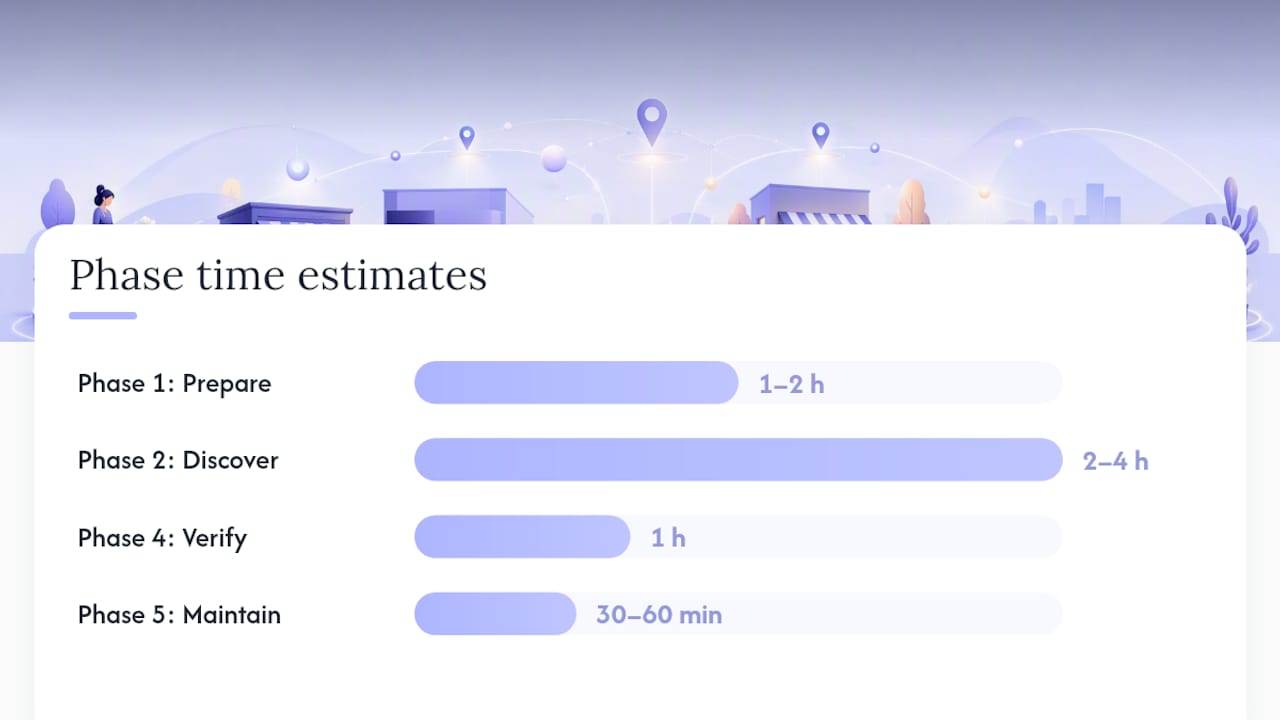
Phase 1: Prepare (Day 1, 1–2 hours, Owner or Marketing Lead)
- Write your canonical NAP document (name, address, phone, preferred formats).
- Confirm the legal business name and any registered trade names.
- Create your audit spreadsheet with the column headers listed in the audit section.
- Identify who owns each platform login (GBP, Yelp, YellowPages, etc.).
Phase 2: Discover (Day 1–2, 2–4 hours, Marketing Lead)
- Run Google searches for your exact name, phone, and address in quotes.
- Check your website footer, contact page, and schema markup.
- Export your GBP listing details.
- Visit each major directory manually: Yelp Canada, YellowPages Canada, 411.ca, Bing Places, Foursquare.
- Run a BrightLocal or Whitespark scan for broader coverage.
- Log every citation in your spreadsheet with match status.
Phase 3: Fix (Days 2–14, varies, Marketing Lead + Developer for schema)
- Update website footer and contact page.
- Add or correct
LocalBusinessschema on the homepage. - Claim and correct GBP (30–60 minutes).
- Claim and correct Bing Places (30 minutes).
- Edit top 10 directories, one by one, to match canonical NAP exactly.
- Submit corrections to aggregators for long-tail coverage.
Phase 4: Verify (Days 14–30, 1 hour, Marketing Lead)
- Screenshot each corrected listing with a visible timestamp.
- Re-check GBP and Yelp to confirm edits went live.
- Log verification date in your spreadsheet.
Phase 5: Maintain (Quarterly, 30–60 minutes, Marketing Lead)
- Re-run your audit scan.
- Check for new duplicate listings.
- Update all citations immediately after any address, phone, or name change.
Pro Tip: Keep an internal “NAP change log” with dates, screenshots, and the reason for each change. If a directory reverts your edit or a duplicate reappears, you have documented proof of what the correct information is and when you set it.
Scheduling this quarterly review as a recurring task is straightforward with the right systems in place. Automated scheduling tools can help assign and track these recurring audits without letting them slip.
A perspective on keeping NAP manageable
NAP consistency gets treated as a one-time project when it is actually a systems problem. The businesses that struggle with it are not the ones who made a mistake setting up their listings. They are the ones who have no process for what happens when the phone number changes, when they move, or when a new staff member claims a listing without checking the canonical NAP document first.
The fix is not more effort. It is a single source of truth document, a quarterly calendar reminder, and a clear owner for each platform. That is a 30-minute setup that prevents months of citation drift.
Small businesses often assume they need an agency or an expensive SaaS subscription to get this right. For a single location, that is rarely true. The manual checklist in this guide, combined with a free or low-cost BrightLocal or Whitespark scan, covers the vast majority of what matters. The paid tools earn their cost when you have multiple locations, frequent changes, or no internal time to manage it.
Where agencies genuinely add value is in the discovery phase, specifically finding citations you did not know existed, and in handling the tedious back-and-forth with directories that require manual verification. If your business has moved in the last three years or operates under more than one trade name, that discovery work is worth paying for.
The other underrated factor: your website schema. Most small business websites in Canada have no LocalBusiness schema at all. Adding it takes a developer less than an hour and gives search engines a direct, unambiguous declaration of your canonical NAP. It is the highest-leverage single action on this list, and it costs almost nothing.
How Tech Business Development can help with your NAP and local SEO
Getting your NAP right across every Canadian directory is straightforward once you have a system. Building that system from scratch, while running a business, is where most owners stall.

Tech Business Development sets up and manages Google Business Profile, local citations, and LocalBusiness schema as part of its local SEO service for Canadian small businesses. The process starts with a NAP audit, moves to canonicalisation across your top directories, and includes schema implementation on your website. Pricing is transparent: a one-time setup engagement or an ongoing monthly package depending on how much you want handled. No long-term lock-in on the entry tier.
If you want your listings cleaned up and your GBP optimised without spending weeks on directory portals, book a discovery call with Tech Business Development or visit the services page to see what’s included at each level.
Sources
These resources are worth bookmarking for ongoing NAP and local SEO work:
- What is NAP in Local SEO? - Ahrefs
- What is NAP in SEO? (Plus: Business Directory Listings Tips) - AIOSEO
- Local SEO NAP Is Vital to Your Site | BrightEdge
Use the E-E-A-T checklist in this guide as your project plan, and treat these sources as the reference layer behind it.
Recommended