Google Ads account setup: what Canadian small businesses need


A professionally delivered Google Ads account setup covers account structure, conversion tracking, billing configuration, GA4 and Google Tag Manager integration, Google Business Profile linking, and a documented campaign framework — all configured before a single dollar is spent on ads.
What a complete setup delivers:
- A properly structured account with campaigns, ad groups, and ads mapped to your website pages
- Irreversible settings (time zone, billing country) confirmed and documented before launch
- Conversion tracking configured via Google Analytics 4 and Google Tag Manager, imported into Google Ads
- Google Business Profile linked for local campaigns and call extensions
- A naming convention document and annotated account map handed over at completion
- Access permissions set correctly, including a Manager Account (MCC) if your consultant uses one
- Billing and payment method confirmed, with the correct currency for Canada
If you are ready to move forward, your immediate next step is to document your goals, list your current Google accounts, and contact a consultant for a fixed-scope setup quote. Tech Business Development handles all of this for Canadian small businesses, including GA4, GTM, and Google Business Profile integration.
Table of Contents
- Why getting your Google Ads account setup right the first time matters
- What should a professional Google Ads setup include?
- How should you structure a Google Ads account for a local Canadian business?
- How do you set up conversion tracking before launching Google Ads?
- What does a typical Google Ads onboarding timeline look like?
- What questions should you ask a Google Ads consultant before hiring?
- What should Canadian small business owners do right now?
- Key takeaways
- What most guides get wrong about Google Ads setup
- What Tech Business Development includes in a Google Ads setup
- Useful resources for further reading
Why getting your Google Ads account setup right the first time matters
Some account-level settings in Google Ads are permanent. Your time zone and billing country cannot be changed after the account is created, and both affect your financial reporting and campaign scheduling directly. A consultant who sets the wrong time zone will misalign your ad delivery with your business hours. A wrong billing country locks you into the wrong currency and payment options.
Beyond the irreversible settings, your account structure shapes how Google’s machine learning performs. Smart Bidding needs consolidated, themed ad groups to accumulate enough conversion data to optimise bids effectively. Fragmented structures — too many campaigns, too many ad groups, device-based splits — starve the algorithm of the signal volume it needs. Google’s own guidance advises against unnecessary segmentation like separate campaigns by device, because Smart Bidding already handles device-level adjustments automatically.
Reorganising your account after performance data has built up is costly. Restructuring ad groups after the fact erases historical signals, which means your bidding algorithms start learning from scratch. Getting the structure right before launch protects that data permanently.
Pro Tip: Before your consultant builds anything, agree on a naming convention format that captures network, objective, market, and theme. Changing names after campaigns run breaks continuity in your reports and exports.
What should a professional Google Ads setup include?
A consultant-delivered setup must cover every layer of the account hierarchy: account, campaigns, ad groups, and ads/keywords. Here is what to verify at handover:
Account and billing:
- Billing country set to Canada, currency in CAD, payment method confirmed
- Time zone matched to your business location (e.g., America/Toronto)
- MCC access granted if the consultant manages multiple clients
Campaign and ad group structure:
- Campaigns organised by objective or product/service category
- Ad groups built as Single Theme Ad Groups (STAGs) with 5–15 closely related keywords each
- Separate brand vs. non-brand campaigns documented and justified
- Campaign type selection (Search, Display, Performance Max, Local) explained in the proposal
Tracking and measurement:
- Conversion actions defined, implemented via GTM or direct tag, and verified in GA4
- GA4 property linked to Google Ads and conversions imported
- Phone-call and local conversions configured where applicable
- Remarketing audiences created from GA4 data
Deliverables at handover:
- Annotated account map showing campaign and ad group structure
- Naming convention document (no special characters that break exports)
- List of all conversion actions with definitions and expected values
- Access permissions confirmed in writing
For a single-location small business, one account is sufficient. Multiple accounts are only warranted for distinct legal entities, separate billing jurisdictions, or fully unrelated businesses.
How should you structure a Google Ads account for a local Canadian business?
A compact, consolidation-first structure works best for most small and local businesses. Map your campaigns to your core service or product categories, not to every page on your site.

| Site page / service category | Campaign name example | Ad group (STAG) example | Keywords (theme) |
|---|---|---|---|
| Plumbing repairs | Search_Brand_Plumbing_CA | Brand terms | [Business name] + plumbing |
| Plumbing repairs | Search_NB_Plumbing_CA | Emergency repairs | Emergency plumber, burst pipe repair |
| Plumbing repairs | Search_NB_Plumbing_CA | Drain cleaning | Drain cleaning service, clogged drain |
| HVAC services | Search_NB_HVAC_CA | Furnace repair | Furnace repair, furnace service near me |
| Local foot traffic | Local_GBP_Plumbing_CA | All services | Driven by Google Business Profile |
Keep the naming format consistent: Network_BrandStatus_Category_Market. This makes filtering and reporting straightforward from day one.
Separate brand campaigns from non-brand campaigns. Brand campaigns typically convert at a lower cost and should not compete with non-brand budgets. Performance Max campaigns work well for local businesses with a Google Business Profile, but keep them separate from your Search lead-generation campaigns so you can measure each independently. Smart Bidding handles device-level signals automatically, so there is no need to split campaigns by mobile vs. desktop.
How do you set up conversion tracking before launching Google Ads?
Conversion tracking must be fully configured and tested before any campaign goes live. Without it, Smart Bidding has no signal to optimise toward, and you have no way to measure return on ad spend.
- Define your conversion events. Decide what counts: form submissions, phone calls, purchases, appointment bookings. Assign realistic values where possible.
- Implement tags via Google Tag Manager. GTM lets you deploy and update tags without touching your site code. For e-commerce, consider server-side tagging for more reliable data.
- Verify events in Google Analytics 4. Confirm each conversion fires correctly using GA4’s DebugView and Google Tag Assistant.
- Import conversions into Google Ads. Link your GA4 property to Google Ads and import the conversion actions. This is what feeds Smart Bidding.
- Configure phone-call conversions. For local businesses, call conversions from ads and from your website are often your highest-value actions.
- Enable enhanced conversions if you collect first-party data (email, phone). This improves measurement accuracy when cookies are blocked.
The role of analytics in campaigns goes beyond counting clicks. Accurate conversion data is what allows bidding strategies like Target CPA and Target ROAS to function properly.
Pro Tip: Run a test conversion before launch. Submit a real form, make a test call, or complete a test purchase and confirm the conversion appears in both GA4 and Google Ads within 24 hours. Do not launch until this check passes.
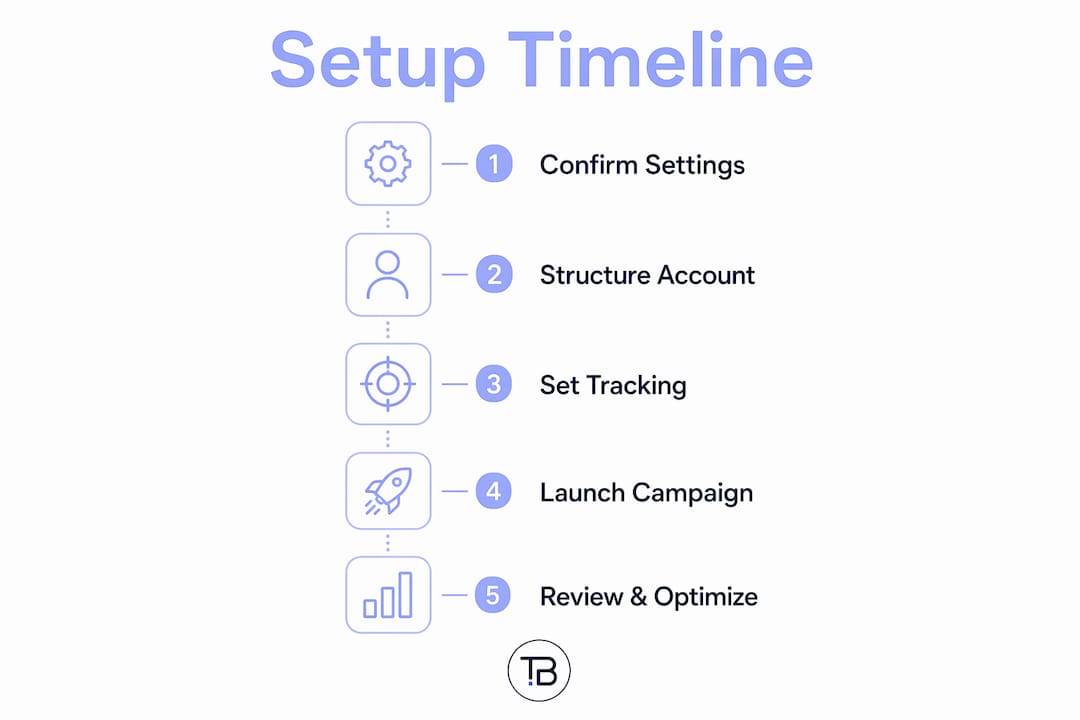
What does a typical Google Ads onboarding timeline look like?
For most small local businesses, a professional setup takes 1–3 weeks from project start to a launch-ready account. Complex tracking requirements, multi-location setups, or e-commerce integrations can extend this to 3–6 weeks.
A solid proposal should include these milestones:
- Discovery and brief (Days 1–2): Goals, budget, target geography, existing accounts audited
- Access and billing setup (Days 2–3): Account created, billing country/time zone confirmed, MCC access granted
- Tracking implementation (Days 3–7): GTM container deployed, GA4 events configured, conversions verified
- Campaign build and asset creation (Days 5–10): Campaigns, ad groups, ads, keywords, extensions built per the agreed structure
- QA and test launch (Days 10–14): Internal review, tag verification, test impressions checked
- Final handover and training (Day 14–21): Account map delivered, naming doc provided, owner walkthrough completed
Factors that slow delivery: missing website access, no existing GA4 property, unclear conversion definitions, or a site that needs tracking code installed by a developer. Having your business automation setup documented in advance cuts days off this timeline.
What questions should you ask a Google Ads consultant before hiring?
Ask focused, technical questions that reveal process, measurement competence, and GA4/GTM experience. A consultant who cannot answer these clearly is not ready to manage your account.
Questions to ask:
- How do you structure ad groups, and do you use STAGs or SKAGs? Why?
- How do you handle GA4 and GTM setup — do you deploy the tags yourself?
- What conversion actions will you configure, and how will you verify them before launch?
- How do you handle brand vs. non-brand campaign separation?
- Will you use a Manager Account (MCC)? Who retains admin access after launch?
- What campaign types do you recommend for my business, and why?
Red flags to watch for:
- Avoids discussing GA4 or GTM setup, or outsources it without explanation
- Promises guaranteed ad positions or specific click volumes
- Recommends creating multiple accounts without a clear legal or billing reason
- Does not document irreversible settings (time zone, billing country) before creating the account
- Refuses to transfer admin access to you after the campaign launches
- Cannot explain the difference between Performance Max and Search campaigns
A consultant who wants to retain sole ownership of your account after launch is a structural problem. You should always hold admin access to your own Google Ads account. Proper brand trust starts with transparency about who controls your data and your spend.
What should Canadian small business owners do right now?
Three actions to take before you contact a consultant:
- Document your goals. Write down what a conversion means for your business (call, form, purchase, visit) and what you are willing to pay for one.
- List your current Google accounts. Gather access to your Google Business Profile, any existing GA4 property, your website’s CMS or hosting admin, and your preferred billing method.
- Prepare your website pages. Identify the landing pages for each service or product category you want to advertise. These map directly to your campaign and ad group structure.
When you request a quote, ask for a fixed-scope setup package with a clear deliverables list and timeline. If you need ongoing management after launch, ask about a monthly managed plan that includes optimisation, reporting, and tracking maintenance. Understanding business growth strategies before your first consultation helps you frame your goals in terms a consultant can act on immediately.
Key takeaways
A professional Google Ads account setup requires correct irreversible settings, pre-launch conversion tracking, a consolidated STAG-based structure, and full documented handover before any campaign goes live.
| Point | Details |
|---|---|
| Irreversible settings first | Confirm time zone and billing country (Canada/CAD) before the account is created — these cannot be changed later. |
| Conversion tracking before launch | GA4 and GTM must be configured, tested, and imported into Google Ads before any campaign goes live. |
| STAG ad group structure | Use Single Theme Ad Groups of 5–15 related keywords to give Smart Bidding enough data to optimise. |
| Separate brand campaigns | Keep brand and non-brand campaigns distinct so budgets and performance data stay clean and comparable. |
| Demand documented deliverables | Require an account map, naming convention doc, conversion definitions, and confirmed access permissions at handover. |
| Tech Business Development | Provides fixed-scope Google Ads setup with GA4, GTM, and Google Business Profile integration for Canadian small businesses. |
What most guides get wrong about Google Ads setup
The conventional advice focuses on the mechanics: create an account, pick a campaign type, set a budget. What gets skipped is the decision architecture that determines whether the whole thing works six months later.
The time zone and billing country settings feel like admin details. They are not. A consultant who rushes past them because the client is eager to launch has made a permanent mistake. The same logic applies to account structure. Most small business owners do not realise that restructuring campaigns after data has accumulated is not a minor inconvenience — it resets the learning period for Smart Bidding entirely.
The shift from SKAGs to STAGs is worth understanding too. Single keyword ad groups were once considered best practice. They are now counterproductive because they fragment conversion data across too many ad groups, leaving each one below the threshold Smart Bidding needs to function. Grouping 5–15 semantically related keywords per ad group is not a compromise. It is what the algorithm actually needs.
The other thing most guides understate is access. Who owns the account after setup matters as much as how it is built. A consultant who retains sole admin access has structural leverage over your business. Always hold your own admin credentials.
What Tech Business Development includes in a Google Ads setup
Skip the agency retainer. Tech Business Development delivers fixed-scope Google Ads account setup for Canadian small businesses at a fraction of traditional agency cost, with GA4, GTM, and Google Business Profile integration included as standard, not as add-ons.

A basic setup package covers account creation with correct Canadian billing configuration, campaign and ad group structure mapped to your site, conversion tracking via GA4 and GTM, and a full handover with documented naming conventions and access permissions. Premium packages add 30-day post-launch optimisation, call tracking, Performance Max configuration, and monthly reporting. Pricing follows a fixed setup fee plus an optional monthly management plan, so there are no surprise invoices.
Tech Business Development has delivered fast, compliant setups for local service businesses, retail, and professional services across Canada. The team handles GA4 and GTM deployment internally, which means no waiting on a third-party developer to install tags. To get a scope and timeline for your business, visit the services page or reach out directly for a discovery call.
Useful resources for further reading
These are the primary sources your consultant should be familiar with and able to certify against:
- Google Ads account organisation — Google’s official explanation of the four-level account hierarchy and why account-level settings are permanent. Share this with any consultant who questions why time zone and billing country need to be confirmed before account creation.
- Organise your account with ad groups — Google’s guidance on aligning ad groups to site structure to preserve historical performance data. Directly supports the site-mapped structure approach in this guide.
- The ABCs of account structure — Google’s consolidation-first framework explaining why STAGs outperform SKAGs and why device-based campaign splits are unnecessary with Smart Bidding active.
- How to set up your first Google Ads campaign — Google’s own pre-launch checklist, including the recommendation to configure conversion tracking before going live.
- Marketing analytics best practices — A consultant-focused guide to connecting GA4 data to ongoing campaign optimisation and automated reporting after setup.
Recommended