Google Business Profile verification: Canada guide 2026


The fastest reliable route to verify your Google Business Profile in Canada is video verification. Record a single, continuous, unedited mobile video of at least 30 seconds showing your exterior signage, entrance, interior, and proof that you manage the business, then upload it directly from your phone at the location. Google’s review can take several business days, though many profiles receive a decision sooner. If video is not offered, phone or SMS verification is the next quickest option. Postcard delivery in Canada typically adds several extra days on top of Google’s review window, so it is worth exhausting faster methods first.
To start, go to business.google.com, find or add and claim your Business Profile, then select “Verify.” Google determines which methods are available to you automatically based on your business type, location data, and the information already on file.
Table of Contents
- What to prepare before you start verification
- Which verification methods does Google offer in Canada?
- How to record a video verification that actually passes
- Bulk verification for multiple locations in Canada
- What to do when verification fails
- What actually changes once your profile is verified
- How long does verification take in Canada?
- How Tech Business Development helps Canadian businesses get verified
- Key takeaways
- The part most guides skip
- Get your Google Business Profile verified without the back-and-forth
- Official sources and further reading
What to prepare before you start verification
Skipping this step is the single most common reason Canadian business owners end up waiting weeks instead of days. Get these items sorted before you touch the verification button.
- Google Account access: — Confirm you are signed into the Google Account you intend to use for ongoing profile management. Switching accounts mid-process creates access problems later.
- NAP consistency: — Your business name, address, and phone number must match exactly across your website, government registration documents, and the profile itself. Even small mismatches like “St.” versus “Street” or a missing suite number can block certain verification methods or cause postcard delivery to fail.
- Supporting documents: — Keep a business licence, utility bill, or recent supplier invoice on hand. Google may ask for these during or after video review.
Pro Tip: Before recording anything, cross-check your address format against Canada Post’s official address standards. A missing unit number or an abbreviated street type is enough to trigger a rejection, and fixing it after the fact resets your timeline.
Which verification methods does Google offer in Canada?
Google exposes six core verification methods through its Business Profile API: ADDRESS (postcard), EMAIL, PHONE_CALL, SMS, AUTO (instant), and VETTED_PARTNER. You do not choose freely among them. Google presents only the options it determines are appropriate for your business, and that set can change as your profile matures.
| Method | How it works | Typical speed | Best for |
|---|---|---|---|
| Video recording | Continuous mobile video uploaded at the location | Up to 5 business days review | Most new profiles; storefront, hybrid, and service-area businesses |
| Phone / SMS | Google calls or texts a code to the listed number | Minutes | Established businesses with a verified phone number on file |
| Code sent to a domain-matching email address | Minutes | Businesses with a professional email matching their website domain | |
| Postcard (ADDRESS) | Physical postcard mailed to the business address | several days delivery in Canada, plus review | Businesses where no faster method is offered |
| Instant / AUTO | Automatic verification based on existing Google data | Immediate | Businesses already verified in Google Search Console or with strong data signals |
| Vetted Partner | Verification through an authorised Google partner | Varies | Enterprise accounts or agency-managed profiles |
A few Canada-specific notes worth knowing. Postcard delivery to rural addresses or remote postal codes can push past the standard 5–14 day window, particularly in northern regions. Phone verification is only offered when the listed number is publicly associated with the business. Instant verification is rare for brand-new profiles but common for businesses that have already verified their website domain in Google Search Console.
Bulk verification, covered in its own section below, sits outside this table because it is a separate process rather than a single-location method.
How to record a video verification that actually passes
Google requires a single, unedited, continuous mobile recording meeting minimum length requirements, uploaded from a mobile device while you are physically at the business location. That last part matters: the upload must happen on-site, not from home later.
The most common reason video verifications fail is a missing exterior-to-interior transition. Reviewers, both automated and human, expect to see a clear visual link between the outside of the building and the inside. Start outside, walk in, keep the camera moving.
Shot-by-shot recording order
- Exterior signage and address: — Begin outside. Frame the business sign clearly, then pan to show the street address or building number. Hold each shot for 2–3 seconds.
Technical requirements and tips
- Record in landscape orientation for the clearest framing.
- Keep location services turned on throughout the recording and upload.
- Avoid capturing faces of staff or customers; blur or reframe if needed.
- Do not show sensitive documents like banking information or personal ID numbers.
- Upload immediately after recording. Do not email the file to yourself and upload from a desktop.
Pro Tip: Narrate quietly as you record. Saying “this is the front of [Business Name] at [address]” while the camera shows the sign gives reviewers an audio anchor that matches the visual. It is not required, but it reduces ambiguity.
Video rejection troubleshooting
| Rejection reason | Likely cause | Fix |
|---|---|---|
| Location unclear | No exterior shot or address not visible | Re-record starting from the street with address in frame |
| No proof of management | Missing documents or branded assets | Add a business licence or branded equipment to the shot |
| Video edited or cut | Multiple clips stitched together | Record in one continuous take from start to finish |
| Upload from wrong device | Sent from desktop or tablet | Re-upload directly from the phone used to record |
| Interior not shown | Recording stopped at the entrance | Continue walking through the door and into the main space |
If video verification is rejected after a correct re-submission, Google may offer a live video call option as an alternative. That call follows a similar format but happens in real time with a Google reviewer.
Bulk verification for multiple locations in Canada
Bulk verification applies when a business manages ten or more locations under the same ownership. It is not available for franchises where each location is independently owned, and Google will not grant it for a mix of unrelated businesses bundled together.
Eligibility checklist:
How to request bulk verification:
- Sign into business.google.com and open the Business Group containing your locations.
- Select “Get verified” from the group dashboard. If bulk verification is available, Google will present it as an option
For developers or agencies managing large portfolios, the fetchVerificationOptions API endpoint returns the eligible verification options for each location programmatically. It requires the business.manage OAuth scope and is the most efficient way to check which methods are available across dozens of locations without opening each profile manually.
Bulk verification is commonly refused when NAP data is inconsistent across locations, when the account is new, or when some locations are missing required information like a phone number or service area. Fix those gaps before applying.
What to do when verification fails
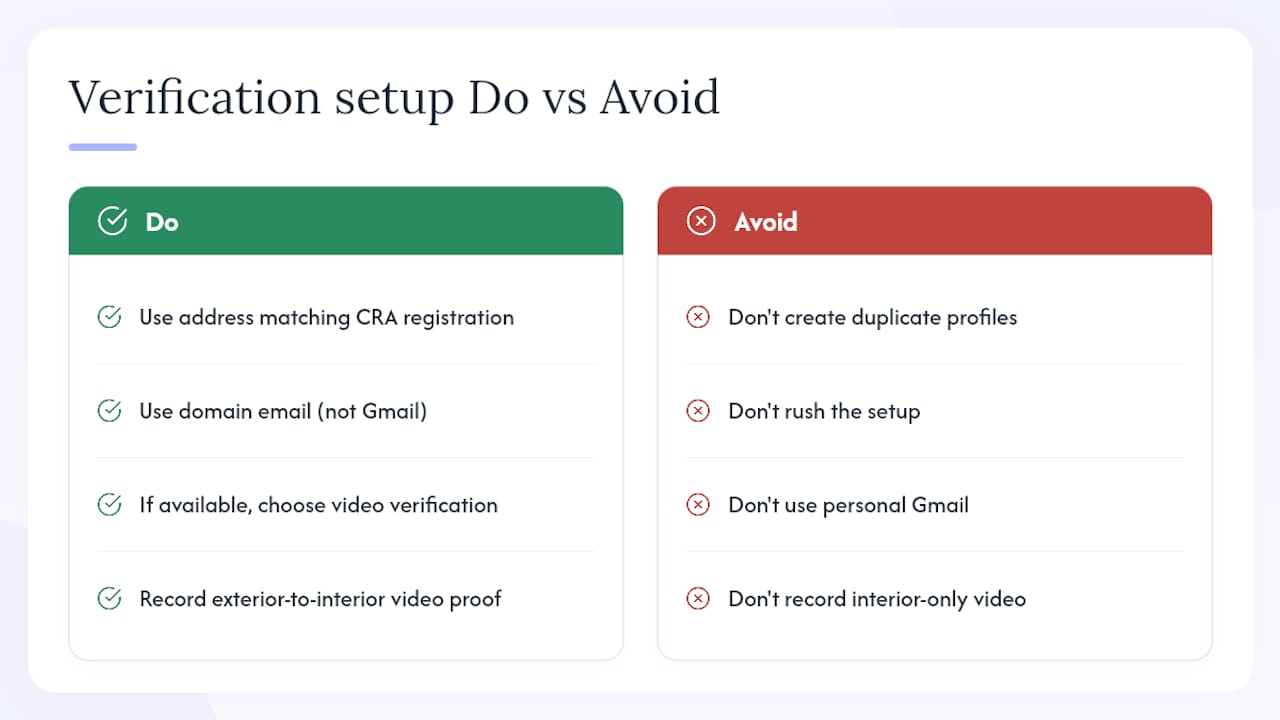
The worst move after a failed verification is to create a new profile or immediately re-request the same method without changing anything. Both approaches make the problem worse. Google’s systems flag duplicate profiles, and repeated failed attempts can lock you out of certain methods temporarily.
Do these things first:
- Read the failure notice carefully. Google usually specifies the reason, whether it is a video issue, an address mismatch, or a missing document
- Correct the specific problem before doing anything else. If the address on the profile does not match your business registration, fix the profile first
Avoid these mistakes:
If you are stuck and no verification method is being offered, contact Google Business Profile support directly through the Help menu in your profile dashboard. Keep a record of your support case number.
Pro Tip: If postcard verification has failed twice and no other method is appearing, check whether your address is formatted to Canada Post standards. A missing unit designator or an incorrect postal code is enough to suppress the postcard option entirely.
Google’s verification is free. If someone is charging you to “unlock” or “approve” your profile through Google itself, that is not a legitimate Google service.
What actually changes once your profile is verified
Verification is not just a formality. Before it, your profile is essentially a placeholder. After it, you have full management access and Google treats the information as owner-confirmed, which affects how the listing ranks and displays.
What you can do after verification:
- Edit your business name, address, phone, hours, and categories
- Respond to customer reviews publicly
- Add photos, posts, products, and services
- View search and map performance data through the Insights tab
- Add or remove profile managers
Quick wins to act on immediately:
- Set accurate business hours, including holiday hours
- Upload at least five photos covering the exterior, interior, and team
- Add your primary service category and at least two secondary categories
- Write a business description (750 characters maximum) that includes your main service and city
Security: Turn on 2-Step Verification for the Google Account managing the profile. If that account is ever compromised, your profile can be edited or transferred without your knowledge.
One thing to watch: major edits after verification, particularly changing your business name or address, can trigger a re-verification request. Google treats significant changes as a signal that the business may have moved or changed ownership. Keep a record of your original verification documents in case you need them again.
Pro Tip: Add a second profile manager from a different Google Account as a backup. If the primary account is ever locked, you will not lose access to the profile entirely.
How long does verification take in Canada?
| Method | Typical timeline |
|---|---|
| Instant / AUTO | Immediate |
| Phone / SMS | Minutes |
| Minutes | |
| Video recording | Several business days for review |
| Postcard (ADDRESS) | Several days delivery plus review |
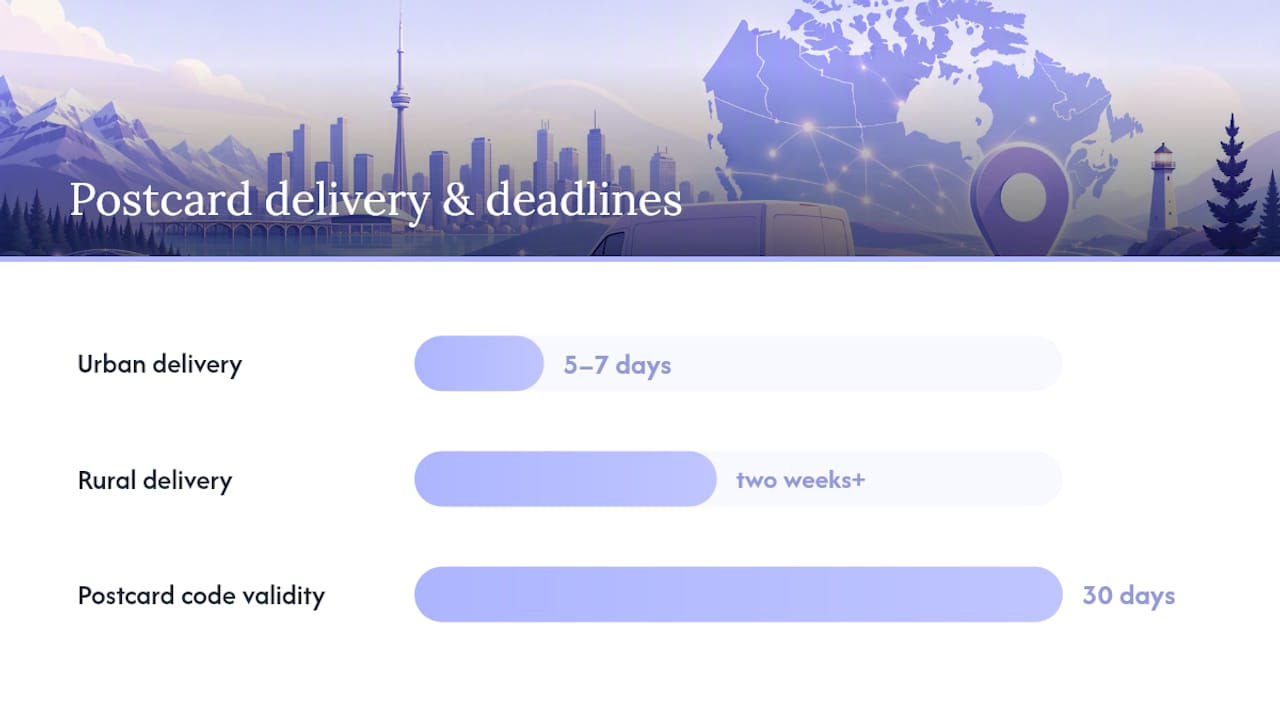
The postcard window is the one that catches most Canadian business owners off guard. Canada Post delivery to urban addresses in Toronto, Vancouver, or Calgary tends to land within 5–7 business days. Rural and remote addresses can push that to two weeks or beyond, and that is before Google’s review clock even starts.
Common timing mistakes that delay verification:
- Requesting a second postcard before the first one has had time to arrive. Each new request resets the delivery window.
- Editing the business address while a postcard is in transit. The postcard is addressed to the version of the address that was on file when it was sent.
- Letting a verification code expire. Postcard codes are valid for 30 days; SMS and email codes expire within minutes.
- Starting verification from a desktop browser when video is the assigned method. Video must be recorded and uploaded from a mobile device.
If a postcard has not arrived after 14 business days, use the “Request another code” option in the profile dashboard. Before doing so, double-check the mailing address against Google’s address guidelines to confirm it is formatted correctly for Canada Post delivery.
How Tech Business Development helps Canadian businesses get verified
Getting a profile verified sounds straightforward until you are standing in your parking lot trying to record a video that keeps getting rejected, or waiting on a postcard that never arrives. Tech Business Development handles the full verification process for Canadian small businesses, from the initial profile audit through to confirmed verification and post-verification setup.
What a verification engagement typically includes:
- Profile audit: checking NAP consistency across your website, Google profile, and government records before anything is submitted
- Shot-list preparation: a custom checklist of what to capture on video based on your business type (storefront, service-area, or hybrid)
For businesses managing multiple locations, Tech Business Development can also run API-based verification checks using the fetchVerificationOptions endpoint to identify which methods are available across the portfolio before submitting anything.
Pro Tip: Bundling your Google Business Profile setup with Google Ads and GA4 configuration means all three are consistent from day one. Mismatched business names or addresses across Google products create tracking gaps that are annoying to untangle later.
Explore the full range of Google services and automation packages available for Canadian small businesses.
Key takeaways
Video verification is the fastest and most reliable method for most Canadian businesses, with Google’s review taking up to 5 business days and postcard delivery adding a further 5–14 days on top.
| Point | Details |
|---|---|
| Prepare NAP before starting | Match your name, address, and phone exactly to government records and your website before submitting. |
| Choose video when offered | Video verification is the fastest reliable method; record a continuous 30-second minimum shot from exterior to interior. |
| Never create duplicate profiles | If verification fails, fix the underlying issue and wait for Google to offer alternate methods. |
| Postcard timing in Canada | Allow 5–14 business days for delivery plus up to 5 business days for review; rural addresses may take longer. |
| Secure your account | Enable 2-Step Verification and add a backup manager to protect profile access after verification. |
| Tech Business Development | Offers full verification support for Canadian businesses, including video guidance, profile setup, and multi-location API checks. |
The part most guides skip
Most articles on this topic treat Google Business Profile verification as a one-time checkbox. It is not. The quality of the information you submit during verification sets the baseline for everything that follows: how Google categorises your business, which searches surface your profile, and whether future edits trigger re-verification.
The businesses that run into the most trouble are the ones that rush the setup. They enter an address that is slightly different from their Canada Revenue Agency registration, use a personal Gmail instead of a domain email, or record a video that starts inside the building because they assumed the interior was the important part. Each of those choices costs time.
There is also a subtler issue with duplicate profiles. When verification fails and a business owner creates a second profile to try again, they often end up with two live listings competing against each other in local search. Cleaning that up requires a support ticket and sometimes weeks of back-and-forth. The original profile, fixed and re-submitted, would have been resolved faster.
One more thing: if video verification is available to you, take it. It is not the most intuitive method, but it is the one Google trusts most for new profiles. A well-recorded video that follows the exterior-to-interior flow and shows clear proof of management will almost always clear review faster than waiting for a postcard to find its way through the postal system to a rural address in January.
Get your Google Business Profile verified without the back-and-forth
For Canadian small-business owners who have already spent too much time on a profile that still says “unverified,” there is a faster path. Tech Business Development sets up and verifies Google Business Profiles as part of a bundled Google services package that also covers GA4, Google Tag Manager, and Google Ads configuration, all handled internally at rates built for small businesses.

The verification package includes a full NAP audit, a custom video shot-list for your business type, hands-on recording guidance, and post-verification profile optimisation so your listing is ready to attract customers from day one. Multi-location businesses get API-based eligibility checks across all locations before a single submission goes in.
Book a Google services consultation and have your profile verified, optimised, and working for your business within the week.
Official sources and further reading
These are the primary Google references used throughout this guide. Each one is publicly available and worth bookmarking if you manage your own profile.
- Verify your business on Google - Google Business Profile Help
- Verify your business with a video recording - Google Business Profile Help
- VerificationMethod | Google Business Profile APIs | Google for Developers
- Method: locations.fetchVerificationOptions | Google Business Profile APIs | Google for Developers
- 2. Verify your business - Google Business Profile Help
- Add or claim your Business Profile - Google Business Profile Help
- Address and business location guidelines - Google Business Profile Help
- Regarding google businesses verification (Google Business Profile support thread)
Recommended