Technical SEO audit: your complete 2026 checklist


A technical SEO audit verifies that search engines and AI crawlers can find, render, and index your site. Run one now and you will typically uncover 15–25 actionable issues per site, with indexation failures and Core Web Vitals problems at the top of the impact list.
Before anything else, run these six checks. They take under 30 minutes and tell you whether your site has a fundamental access problem:
- robots.txt — fetch
yourdomain.com/robots.txtand confirm noDisallow: /rule is blocking Googlebot - XML sitemap — confirm it returns HTTP 200 and lists only canonical, indexable URLs
- Google Search Console coverage — compare submitted sitemap URLs against indexed page count; a large gap signals orphan pages or noindex leaks
- Googlebot access — use GSC’s URL Inspection tool on your top five revenue pages and confirm “URL is on Google”
- Key page status codes — crawl your homepage, category pages, and top landing pages; every one should return 200
- Noindex/disallow sweep — spot-check five pages in GSC URL Inspection for accidental
noindexmeta tags or header directives
Fix any crawl or indexation block before touching meta tags, alt text, or page copy. A page Google cannot access earns zero ranking benefit from on-page improvements.
Record every result in a spreadsheet as you go. The Crawl → Diagnose → Prioritise → Fix → Verify loop is what separates an audit that ships fixes from one that produces a report nobody reads.
Key takeaways
A technical SEO audit requires fixing crawl and indexation blocks first, then Core Web Vitals, then on-page signals — in that order, scored by impact and effort, with every fix verified in Search Console.
| Point | Details |
|---|---|
| Fix indexation before anything else | Crawl blocks and noindex errors cancel every other SEO effort; resolve them in the first sprint. |
| Audit at the page-group level | Core Web Vitals template fixes affect thousands of URLs at once; never diagnose by site average. |
| Use three data sources together | Crawler + Search Console + server logs give a complete picture; no single tool covers all gaps. |
| Score every issue before assigning it | Impact × effort scoring prevents low-value tasks from crowding out high-impact fixes. |
| Tech Business Development for managed audits | Tech Business Development delivers scoped crawl, log analysis, priority plan, fixes, and GSC verification for Canadian businesses. |
Table of Contents
- What does a full technical SEO audit checklist cover?
- How do you run a crawl and reconcile it with Search Console?
- How do you validate canonicals, meta tags, and structured data?
- Are your sitemap, robots.txt, and HTTPS configuration correct?
- What do server logs reveal that crawlers cannot?
- How do you prioritise fixes and estimate timelines?
- Which tools should you use for a technical SEO audit in Canada?
- When should you DIY the audit and when should you hire help?
- Tech Business Development handles your technical SEO audit end to end
- Authoritative sources and further reading
What does a full technical SEO audit checklist cover?
A complete site audit checklist works through eight categories in a fixed order. Indexation and crawl issues come first because every other fix is wasted if Google cannot reach the page.
1. Crawl and indexability
- Run a full crawl with Screaming Frog SEO Spider or Ahrefs Site Audit using a Googlebot user agent and JavaScript rendering enabled.
- Export: status codes, canonical tags, meta robots, redirect chains, hreflang tags, and page titles.
- Flag all 4xx and 5xx responses, redirect chains longer than two hops, and pages with
noindexthat should be indexed. - Cross-reference the crawl export against your XML sitemap and GSC coverage report.
Quick fix: Remove 4xx URLs from your sitemap immediately. Redirect chains longer than two hops compress to a single 301.
2. Performance and Core Web Vitals
- Pull the Core Web Vitals report in GSC for field data grouped by page template.
- Run PageSpeed Insights on your top five pages for lab data.
- Flag any page group where LCP exceeds 2.5s, INP exceeds 200ms, or CLS exceeds 0.1.
Quick fix: Compress and lazy-load images below the fold; defer non-critical JavaScript.
3. Mobile readiness
- Use Google’s Mobile-Friendly Test on key landing pages.
- Check GSC’s Mobile Usability report for tap-target and viewport errors.
- Confirm your site uses a responsive layout, not a separate
m.subdomain with duplicate content.
4. On-page technical signals
- Export all page titles and meta descriptions from your crawler; flag duplicates and blanks.
- Check canonical tags point to the correct, preferred URL on every page.
- Validate structured data with Google’s Rich Results Test and Schema Markup Validator.
5. Structured data
- Identify which Schema.org types apply to your content (Article, Product, LocalBusiness, FAQ).
- Implement markup in JSON-LD format.
- Confirm every marked-up claim is visible on the page itself.
6. Security and HTTPS
- Confirm your site loads on HTTPS with a valid TLS certificate.
- Check that HTTP URLs redirect to HTTPS with a 301, not a 302.
- Verify no mixed-content warnings appear in Chrome DevTools.
7. Sitemaps and robots.txt
- Fetch your sitemap and confirm it returns 200 with valid XML.
- Validate robots.txt for accidental
Disallowrules after every deploy. - Submit your sitemap in GSC and monitor for errors.
8. Redirects and canonicals
- Map all redirect chains; collapse anything longer than two hops.
- Confirm canonical tags match the URL Google should index, including protocol and trailing slash.
- Check for canonical loops (Page A canonicals to Page B, which canonicals back to Page A).
Prioritisation rule: Score every issue on a simple impact × effort grid. Indexation blocks and crawl errors score highest on impact and are usually low effort to fix. Core Web Vitals improvements score high impact but often require engineering time. Meta tag cleanup is low effort but low impact — do it last.
Pro Tip: After running Screaming Frog, filter the export by “noindex” and cross-reference against your top organic landing pages in GSC. You will occasionally find a high-traffic page accidentally tagged noindex after a CMS template update — a fix that takes two minutes and recovers rankings within days.
How do you run a crawl and reconcile it with Search Console?
Crawling your site and comparing the output against GSC is where most indexation problems surface. A crawler sees your site the way a bot does; GSC tells you what Google actually did with it.
Crawler settings that matter:
- Set the user agent to Googlebot Desktop (or Googlebot Smartphone for mobile-first audits)
- Enable JavaScript rendering if your site uses a JS framework like React or Next.js; without it, the crawler misses dynamically injected content
- Set crawl depth to at least six levels and increase the crawl limit above the default for large sites
- Export these fields at minimum: URL, status code, canonical URL, meta robots, redirect destination, hreflang, title, and word count
Reconciling crawler exports with GSC and sitemaps:
| Discrepancy | What it likely means | Next step |
|---|---|---|
| Crawler finds URL; sitemap does not list it | Orphan page — no internal links or sitemap entry | Add to sitemap or add internal links |
| Sitemap lists URL; GSC shows “Crawled — not indexed” | Thin content, duplicate, or quality signal issue | Improve content or consolidate with canonical |
| GSC shows URL indexed; crawler returns 4xx | Soft 404 or server misconfiguration | Fix the server response or redirect to live page |
| Crawler finds URL; GSC shows “Excluded by noindex” | Intentional or accidental noindex tag | Verify intent; remove tag if page should be indexed |
| Sitemap lists URL; crawler returns 301 | Sitemap contains redirected URLs | Update sitemap to list final destination URLs |
Server log analysis adds a third data layer that neither the crawler nor GSC provides: what Googlebot actually requested, how often, and which pages it skipped entirely. Combine all three sources for high-confidence diagnosis.
After fixes, validation looks like this: resubmit the corrected URLs in GSC URL Inspection, wait for recrawl confirmation, then recheck the coverage report within two to four weeks. A drop in “Excluded” URLs and a rise in “Indexed” URLs confirms the fix worked.
Pro Tip: Export your GSC coverage report as a CSV and paste it into the same spreadsheet as your crawler export. A VLOOKUP on the URL column surfaces mismatches in seconds, even on sites with thousands of pages.
How do you validate canonicals, meta tags, and structured data?
On-page technical signals are where CMS platforms leak the most problems at scale. A single template misconfiguration can affect thousands of URLs simultaneously.
Canonicals:
Canonical failures come in predictable patterns. The most common: a CMS that outputs http:// canonical tags after the site migrated to https://, creating a protocol mismatch that splits link equity. Others include self-canonicals pointing to a paginated URL instead of the root page, and canonical tags that point to a 301 redirect rather than the final destination.
Validate canonicals at scale by exporting the canonical URL column from your crawler and running a formula to flag any row where the canonical does not exactly match the page URL (for self-canonicals) or does not match the intended canonical target. Check for trailing slash inconsistencies too — example.com/page and example.com/page/ are treated as different URLs.
Meta titles and descriptions:
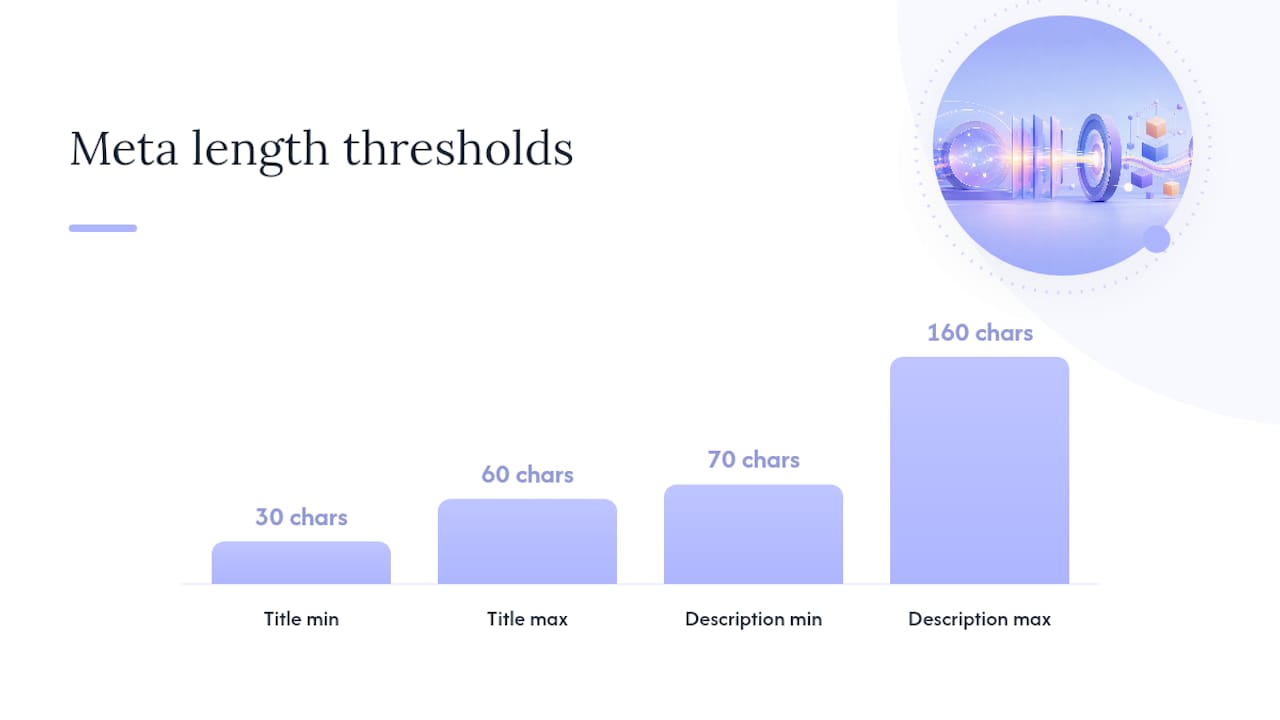
Export all titles and descriptions from your crawler. Sort by character count and flag anything under 30 characters or over 60 characters for titles, and under 70 or over 160 characters for descriptions. Then sort by value and flag duplicates. On CMS-driven sites, duplicate titles almost always trace back to a template that outputs the site name plus a category name with no page-specific variable.
Structured data:
Use JSON-LD for all structured data implementations — it is easier to maintain, does not require changes to visible HTML, and is Google’s preferred format. Every property you mark up must be visible on the page. Marking up a review rating that does not appear in the page content is a policy violation and can result in manual action.
For validation, run pages through Google’s Rich Results Test for eligibility checks and the Schema.org Markup Validator for property-level errors. Schema.org is the authoritative vocabulary for every structured data type — Article, Product, LocalBusiness, FAQ, BreadcrumbList — and defines which properties are required versus recommended for each type.
Hreflang for multi-regional sites:
- Every hreflang tag must include a reciprocal tag on the target page
- Use ISO 639-1 language codes and ISO 3166-1 alpha-2 country codes (
en-CA,fr-CA) - Hreflang URLs must return 200 and be indexable — a hreflang pointing to a noindex page is ignored
- Validate with a crawler export filtered by hreflang column; flag any URL in the hreflang attribute that returns a non-200 status
Structured data coverage now affects more than rich results. AI crawler access and schema coverage influence whether AI engines like ChatGPT and Perplexity cite your content — making structured data a 2026 priority beyond traditional search.
Are your sitemap, robots.txt, and HTTPS configuration correct?
These three checks take under an hour and fix some of the most damaging technical issues a site can have.
Sitemap validation:
A valid XML sitemap returns HTTP 200, contains only canonical indexable URLs, and excludes redirected pages, 404s, noindex pages, and paginated duplicates. Fetch your sitemap directly in a browser and check the response code. Then paste the sitemap URL into GSC’s Sitemaps report and look for errors. Common problems: sitemap lists the http:// version of URLs after an HTTPS migration, or a CMS auto-generates a sitemap that includes every tag and category archive page regardless of indexability.
Fix: regenerate the sitemap after correcting canonical and noindex settings, then resubmit in GSC.
robots.txt:
The most dangerous robots.txt mistake is an accidental Disallow: / that blocks the entire site. This happens most often when a staging environment’s robots.txt gets pushed to production. Check your robots.txt after every deploy. Also verify that your sitemap URL is declared in robots.txt with a Sitemap: directive — it helps crawlers find it faster.
Pro Tip: Keep a copy of your production robots.txt in version control. Diff it against the live file after every deployment. A one-line diff catches the staging-to-production mistake before Googlebot does.
HTTPS and redirects:
- Confirm your TLS certificate is valid and not expiring within 30 days (use SSL Labs’ SSL Test)
- All HTTP URLs should 301 to HTTPS — a 302 is temporary and does not pass full link equity
- Check for mixed-content warnings in Chrome DevTools (Security tab) — a single HTTP resource on an HTTPS page triggers a browser warning
- Redirect chains: HTTP → HTTPS → www → non-www is three hops. Collapse to one direct 301
What do server logs reveal that crawlers cannot?
A crawler shows you what is on your site. Server logs show you what Googlebot actually did with it. Those two pictures are often very different.
Key log fields to export and interpret:
| Log field | What to look for | What it means |
|---|---|---|
cs-user-agent |
Filter for Googlebot |
Isolates real Googlebot requests from other bots |
cs-uri-stem |
High-frequency URLs | Pages Googlebot visits most often |
sc-status |
4xx and 5xx counts by URL | Server errors Googlebot encounters that GSC may not surface |
date + time |
Crawl frequency by day | Drops in crawl frequency can signal a crawl budget problem |
cs-uri-query |
Parameter strings | Identifies parameter URLs consuming crawl budget |
time-taken |
Server response time | Slow responses reduce crawl rate |
Server logs answer questions no crawler can: which pages Googlebot actually visited last week, how frequently it returns to your homepage versus deep category pages, and whether it is wasting budget on parameter URLs your crawler never even flagged.
Crawl budget waste — the faceted navigation problem:
Large ecommerce sites with faceted navigation (filter by colour, size, price) can generate millions of parameter URL combinations. Googlebot crawls them, finds thin or duplicate content, and spends its crawl budget there instead of on your actual product pages. The result: new products take weeks to index.
Mitigation patterns, in order of preference:
- Block parameter URLs in robots.txt if they produce no unique indexable content
- Add
noindexto parameter pages that have value for users but not for search - Use canonical tags on parameter pages pointing to the root category
- Prune your XML sitemap to contain only the canonical product and category URLs
Combine log analysis with your crawler export: map the URLs Googlebot visits most frequently against the URLs in your sitemap. Any URL Googlebot crawls frequently that is not in your sitemap and not a canonical page is a crawl budget leak.
How do you prioritise fixes and estimate timelines?
Most audit reports fail not because the findings are wrong but because nobody knows what to fix first. A simple impact × effort scoring system solves that.
Scoring issues:
Score each issue on two axes: traffic or revenue at risk (1–3) and engineering effort required (1–3). Multiply them. Issues scoring 9 (high impact, low effort) go into the next sprint. Issues scoring 1–2 (low impact, high effort) go to the backlog.
- Score 1–2 (backlog): — minor CLS on low-traffic pages, alt text on decorative images, schema enhancements for non-eligible content types
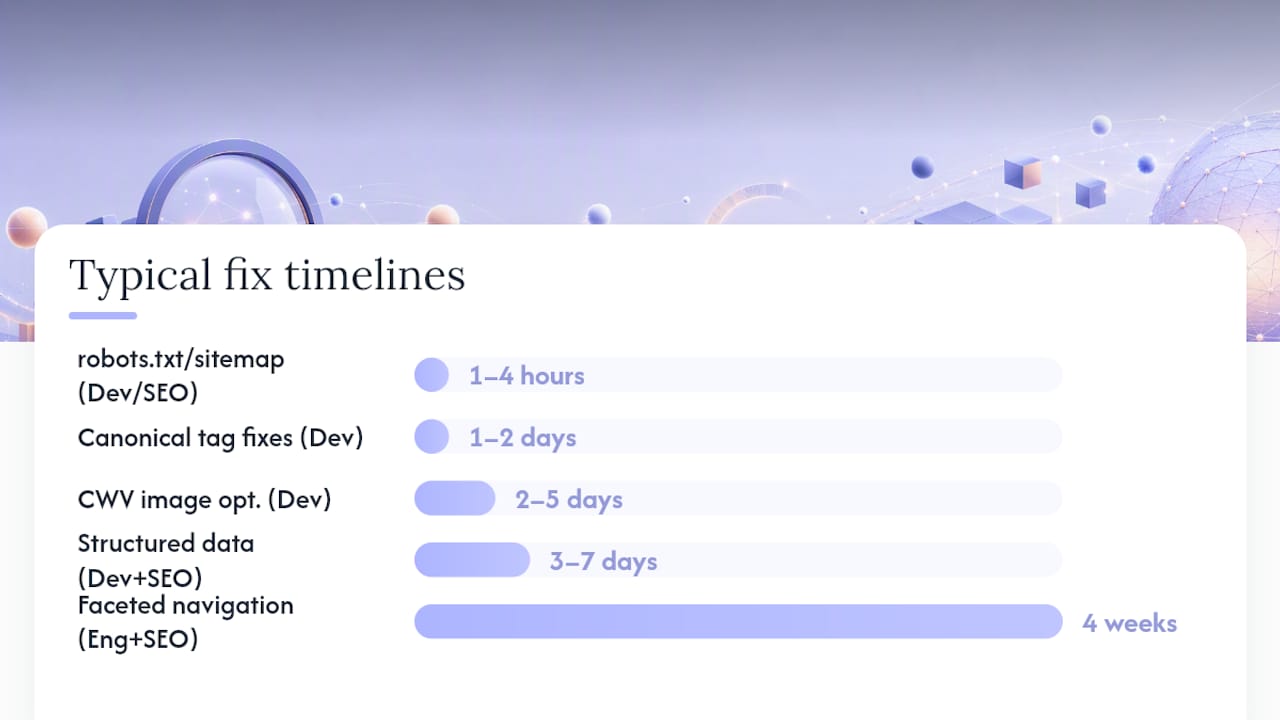
Sample timelines and cost bands:
| Fix category | Typical timeline | Who owns it |
|---|---|---|
| robots.txt / sitemap correction | 1–4 hours | Developer or SEO |
| Canonical tag fixes (CMS template) | 1–2 days | Developer |
| Core Web Vitals (image optimisation) | 2–5 days | Developer |
| Core Web Vitals (JS refactor) | 2–6 weeks | Engineering team |
| Structured data implementation | 3–7 days | Developer + SEO |
| Faceted navigation overhaul | 4 weeks | Engineering + SEO |
| Full HTTPS migration | 1–3 weeks | Developer + hosting |
One honest note on redesigns: if your site has more than 200 redirect chains, a CMS that outputs broken canonicals by default, and a JavaScript rendering problem, incremental fixes often take longer than a planned rebuild with correct technical defaults from the start. That calculation is worth making before committing to a six-month remediation sprint.
Which tools should you use for a technical SEO audit in Canada?
Every tool listed here is available to Canadian users. Paid tools are priced in USD unless noted.
By audit stage:
- Crawl: — Screaming Frog SEO Spider (free up to 500 URLs; paid licence for larger sites), Ahrefs Site Audit (subscription), Semrush Site Audit (subscription)
Tool-by-tool usage notes:
| Tool | Best for | When to use it |
|---|---|---|
| Google Search Console | Index coverage, manual actions, CWV field data | Every audit, every monitoring cycle |
| Screaming Frog SEO Spider | Full site crawl, redirect mapping, canonical export | Start of every audit |
| Ahrefs Site Audit | Crawl + backlink health combined | Large sites where link equity matters |
| Semrush Site Audit | Automated issue scoring, progress tracking | Ongoing monitoring and client reporting |
| PageSpeed Insights / Lighthouse | Lab-based CWV diagnosis | Performance deep-dives per page group |
| SEOptimer | Quick site health score, white-label PDF reports | Agency client onboarding and reporting |
| Rich Results Test | Structured data eligibility per page | After every schema implementation |
| Schema.org Markup Validator | Property-level schema error checking | Schema implementation QA |
Combining tools to cover gaps: no single tool covers everything. A crawler finds what is on your site; GSC tells you what Google did with it; logs tell you what Googlebot actually requested; PageSpeed Insights tells you why a page is slow. Run all four in parallel and cross-reference the outputs. The CMS platform your site runs on also affects which crawl settings and rendering options you need.
When should you DIY the audit and when should you hire help?
The honest answer depends less on your technical confidence and more on your site’s architecture.
DIY works well for sites under 500 pages with a standard CMS (WordPress, Shopify, Squarespace), in-house developer access, and no JavaScript rendering complexity. You can run Screaming Frog, pull GSC data, and work through the checklist in a weekend. The fixes are usually straightforward: update a robots.txt line, fix a canonical template, compress images.
Hire a specialist when the site has faceted navigation generating parameter URLs at scale, multiple subdomains or international hreflang configurations, a headless or hybrid CMS where JavaScript rendering creates indexation blind spots, or a history of manual actions and penalty recovery. These situations require log analysis, rendering audits, and architecture decisions that go beyond checklist execution.
What a good consultancy engagement looks like: a scoped crawl and log analysis delivered in week one, a prioritised issue list with ownership assigned by week two, implementation support through weeks three to six, and a verification pass in GSC at week eight. The verification pass is what most DIY audits skip, and it is where you confirm the fix actually worked rather than assuming it did.
The most common pitfall: running the audit, producing a 40-row spreadsheet, and then handing it to a developer with no priority order and no context. The developer fixes the easiest items first, not the most impactful ones, and the site’s organic performance barely moves. Pairing the audit with a remediation plan and a named owner for each row is what makes the work count. That is also where marketing analytics practices come in — tracking organic performance before and after each fix sprint is the only way to prove the audit delivered ROI.
Tech Business Development handles your technical SEO audit end to end
Getting a clean audit report is one thing. Getting the fixes shipped, verified, and monitored is where most in-house teams stall. Tech Business Development’s managed audit service covers the full cycle: site crawl, server log analysis, GSC reconciliation, a scored priority plan, implementation support, and a post-fix verification pass — all handled by the same team, with no handoff gaps.

For Canadian businesses, that means no coordinating between an offshore audit firm and a local developer. Tech Business Development handles Google Search Console setup, GA4 configuration, structured data implementation, and Core Web Vitals remediation under one engagement. The deliverable is not a PDF of findings — it is a live, verified improvement in your site’s index health and search performance.
Request a scoped audit or visit the Tech Business Development services page to see the full package and book a discovery call.
Authoritative sources and further reading
The sources below were used to build this guide and are worth bookmarking for ongoing reference:
- The Complete Technical SEO Audit Checklist (2026) | Rankeo
- Technical SEO Audit: 5 Steps + Free Template (2026)
- How to Conduct a Technical SEO Audit: The Complete 2026 Framework | Luciano Bonanno
- Free Website Audit Checklist (50 Checks, 2026) | Revamp
- The Complete Technical SEO Audit: A 2026 Checklist
- The Technical SEO (& Beyond) Site Audit Checklist - Moz
For AI and compliance considerations that intersect with technical visibility, the AI vs. traditional methods perspective from AI-Thea offers a useful lens on how AI systems evaluate and surface content differently from traditional search crawlers.
A full technical SEO audit typically uncovers 15–25 actionable issues per site. Prioritise by impact × effort, verify every fix in Search Console, and run the full checklist quarterly for sites that publish frequently or deploy code regularly.
Recommended