Role of AI in admin tasks: a 2026 guide for small businesses


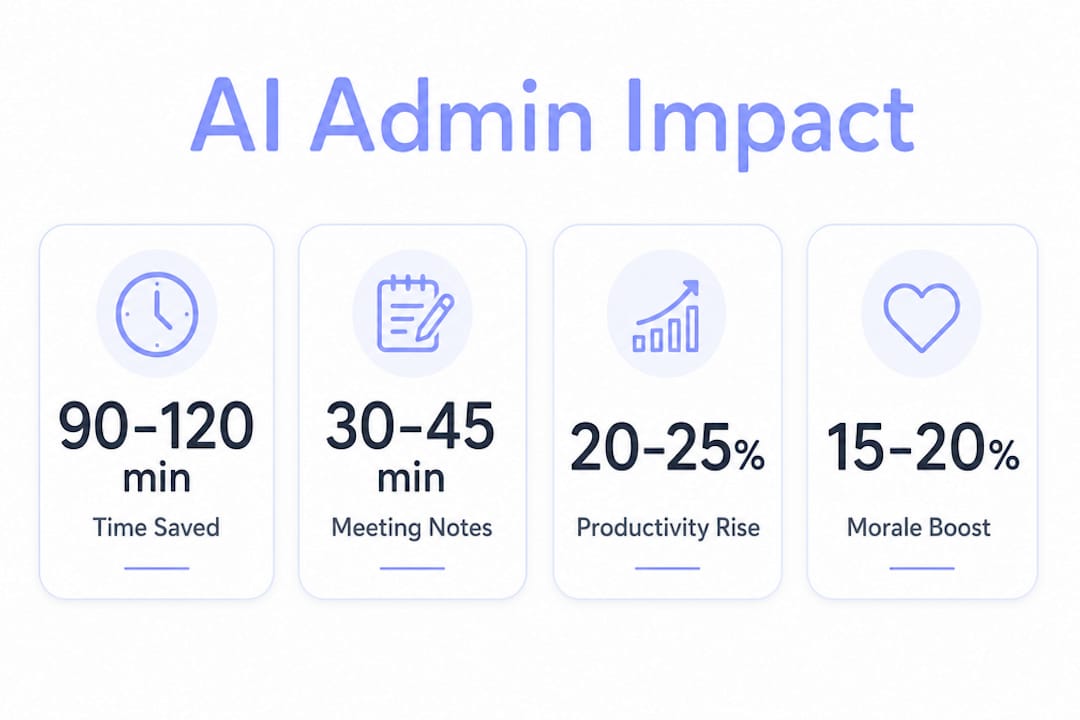
AI in administrative work is defined as the use of machine learning, natural language processing, and workflow automation to handle repetitive office tasks without human intervention. The role of AI in admin tasks goes well beyond basic scheduling. AI workflow automation can reclaim 90–120 minutes of productive time per knowledge worker each day, increasing productivity by 20–25%. That figure means a five-person admin team effectively gains the output of a sixth employee, at no added payroll cost. For small business owners and managers, this is the clearest argument for adopting AI in office management right now.
What administrative tasks does AI automate most effectively?
AI delivers the biggest time savings on tasks that are high-volume, rule-based, and repetitive. The top five are meeting transcription and notes, email triage and drafting, document summarisation, report generation, and approval routing. Each of these tasks follows a predictable pattern, which makes them ideal targets for automation.
Automating administrative duties like scheduling and approval routing removes the back-and-forth that consumes hours each week. A manager who previously spent 45 minutes a day sorting and responding to routine emails can redirect that time to client relationships or team development. The compounding effect across a full year is substantial.

Admin task Estimated time reclaimed daily Meeting notes and transcription30–45 minutes Email triage and drafting20–30 minutes Document summarisation15–20 minutes Report generation15–25 minutes Approval routing 10–15 minutes
The tasks at the top of that table share one trait: they require reading, sorting, and formatting information that already exists. AI handles that mechanical layer faster and more consistently than any human can.
Pro Tip: Involve your team in identifying which tasks to automate first. Organisations that involve employees in selecting automation targets achieve three times higher adoption rates compared to top-down rollouts. Your admin staff know exactly which tasks drain their energy.
Beyond raw time savings, the benefits of AI in admin tasks include a measurable lift in morale. AI adoption leads to 15–20% higher employee engagement and reduced burnout compared to non-AI environments. Removing tedious work is not just an efficiency play. It is a retention strategy.
How does AI change administrative roles and skill requirements?
AI does not replace administrative professionals. It changes what they spend their time on. Administrative assistants gain 1–2 hours daily for strategic and interpersonal work by delegating routine tasks like note-taking and email drafting to AI. That shift moves the role from data handler to relationship manager and decision supporter.
The skills that matter most in an AI-augmented admin role are not technical. The critical capabilities are adaptability, critical thinking, problem-solving, and emotional intelligence. These are the areas where humans outperform any algorithm. An AI can summarise a meeting, but it cannot read the room, manage a difficult stakeholder, or make a judgement call under pressure.
The skills gap is real and documented. Only 12% of business leaders report having the team capabilities needed to execute AI projects, and 56% cite the need to upskill team members in 2026. That gap is not a reason to delay adoption. It is a reason to build a training plan alongside your implementation plan.
Pro Tip: Pair AI rollouts with short, practical training sessions. Managers who communicate early wins visibly across the team see faster buy-in. Visible communication of AI wins boosts employee empowerment and improves engagement in AI-augmented workplaces.
What AI technologies are used to automate administrative functions?
How AI aids in administration depends on which technology layer you deploy. The two main approaches are workflow automation and agentic AI. Workflow automation handles single, defined tasks: send this email when that form is submitted, generate this report every Friday at 8:00 AM. Agentic AI goes further. It executes multi-step tasks autonomously, shifting admin managers’ roles towards workflow analysts who identify AI opportunities rather than perform manual steps.
A practical example of agentic AI is facilities management. Agentic AI in this context reduces real estate overhead by optimising space utilisation, allowing office moves to be planned in hours rather than weeks. The AI monitors occupancy data, models scenarios, and recommends action. A human reviews and approves. That human-in-the-loop structure is what makes the system trustworthy.
Integration with the tools your team already uses is the single biggest factor in adoption success. AI assistants integrated natively with platforms like Slack or Microsoft Teams have higher adoption rates because they reduce context switching. When staff do not need to open a separate app to use AI, they use it more consistently.
AI approachBest use caseIntegration methodWorkflow automationSingle-step, rule-based tasksAPI connectors or native integrationsAgentic AIMulti-step, decision-heavy processesAPI with human approval checkpointsGUI automationLegacy systems without APIsScreen-based automation toolsNative AI featuresCollaboration and communication toolsBuilt-in platform features (Slack, Teams)
For small businesses without a dedicated IT team, starting with native AI features inside tools you already pay for is the lowest-friction path. Slack’s AI summarisation, Microsoft Copilot inside Teams, and Google Workspace’s AI features all require no custom development. You can explore CRM workflow automations as a natural next step once your team is comfortable with basic AI-assisted tasks.
Pro Tip: Choose API-based integrations over GUI automation wherever possible. API connections are faster, more reliable, and easier to audit. GUI automation breaks when software interfaces change, which creates maintenance overhead your team does not need.
What are best practices for implementing AI in admin tasks safely?
Safe AI adoption in administration rests on one principle: keep a human in the loop for any decision that carries financial, legal, or reputational risk. Human-in-the-loop frameworks with approval checkpoints preserve auditability, especially for sensitive financial tasks. Full autonomy is less effective than supervised AI workflows in most administrative contexts.
Governance frameworks like COSO (Committee of Sponsoring Organisations) and the NIST AI Risk Management Framework give small businesses a structured way to think about AI controls. You do not need to implement every element. The core idea is simple: define who approves what, log every automated action, and review the logs regularly.
Practical governance for a small business looks like this:
“The primary goal of AI in administration is to remove repetitive noise so that admins can focus on innovation, connectivity, and judgement. The technology works best when it handles the mechanical and humans handle the meaningful.”
Businesses that identify signs they need automation early tend to implement governance structures before problems arise, rather than after. Starting with a clear picture of your current workflows makes every subsequent decision easier.
Key takeaways
AI in administration works best when it automates rule-based tasks, augments human judgement, and operates within a supervised framework that preserves accountability and auditability.
PointDetailsTime reclaimed is significantAI automation returns 90–120 minutes per knowledge worker daily, equivalent to a 20–25% productivity gain.Adoption depends on employee involvementTeams that choose their own automation targets adopt AI at three times the rate of top-down implementations.Skills gap is the real barrierOnly 12% of business leaders have the team capabilities needed for AI projects; upskilling is the priority for 2026.Human oversight is non-negotiableApproval checkpoints and audit trails are required for any AI handling financial or client-sensitive tasks.Native integrations winAI built into tools like Slack or Microsoft Teams sees higher daily use because it removes the friction of switching apps.
Why I think most small businesses are approaching AI admin adoption backwards
Shayan Shirvani here. After working with small business owners across marketing, logistics, and professional services, I keep seeing the same pattern. Owners buy an AI tool, hand it to their admin team, and expect results. When adoption stalls, they blame the technology. The technology is rarely the problem.
The real issue is sequence. Most teams try to automate tasks before they have mapped those tasks clearly. You cannot automate a process you do not fully understand. The businesses I have seen get the most out of AI in office management are the ones that spent two weeks documenting their current workflows before touching a single tool. That groundwork feels slow. It pays off fast.
My other observation is that managers underestimate how much their admin staff already want AI to work. These are the people doing the most repetitive work. They are not afraid of AI taking their jobs. They are afraid of being stuck doing data entry forever. Give them the tools, give them the training, and get out of the way. The productivity gains from automating competitor analysis and similar reporting tasks are real, but the engagement gains from freeing your team from drudge work are what actually change the culture of a business.
Start small, show the wins publicly, and build from there. AI as an experimentation tool, not a replacement programme, is the mindset that produces lasting results.
How Tech Business Development helps small businesses automate admin work
Small businesses rarely have the time or internal expertise to evaluate, configure, and connect AI tools to their existing workflows. That is the gap Tech Business Development fills.

Tech Business Development’s automation and AI consulting services are built specifically for small and local businesses that need practical results without enterprise-level complexity. The team handles workflow design, tool integration, and ongoing optimisation, cutting manual task loads and reducing operational costs by up to 50%. Whether your priority is email automation, approval routing, reporting, or scheduling, Tech Business Development builds the system around your actual processes. Visit Tech Business Development to see how the right automation setup can free your team to focus on work that actually grows your business.
FAQ
What is the role of AI in admin tasks?
AI in administrative tasks automates repetitive, rule-based work such as email triage, meeting notes, report generation, and approval routing. This frees administrative staff to focus on strategic and interpersonal responsibilities.
How much time can AI save in office management?
AI workflow automation can reclaim 90–120 minutes per knowledge worker each day, representing a 20–25% productivity increase across administrative functions.
Will AI replace administrative assistants?
AI augments rather than replaces administrative roles. Admins gain 1–2 hours daily for higher-value work, while the demand for skills like critical thinking and emotional intelligence increases.
What is a human-in-the-loop framework in AI administration?
A human-in-the-loop framework means AI executes tasks but routes sensitive or high-risk decisions to a human for approval before action is taken. This preserves auditability and reduces the risk of automated errors.
How do small businesses start automating administrative duties?
Start by documenting your current workflows, then identify the highest-volume, most repetitive tasks. Involve your admin team in selecting automation targets, and begin with native AI features inside tools your team already uses before adding custom integrations.