One-page vs multipage website: what small businesses need to know


If your goal is a quick conversion, a portfolio, or a single campaign, a one-page site is usually the faster and cheaper choice. If you need to rank for multiple keywords, publish content regularly, or serve more than one distinct audience, a multi-page site will serve you better almost every time.
The core reason is simple: a one-page site concentrates everything into a single, scroll-driven experience that guides visitors toward one action. A multi-page site creates separate URLs for separate topics, which gives search engines more to index and gives visitors more ways to find you.
Four signals that point to the right format:
- Content volume: If you have multiple distinct topics or service areas, a multi-page site is usually better.
- SEO goals: Targeting multiple keywords or building topical authority? Multi-page wins.
- Conversion style: One clear call to action for a focused audience? One-page works well.
- Budget and timeline: Need to launch in days, not weeks? One-page is faster and cheaper.
Mobile traffic now accounts for the majority of global web visits, which means scroll-based one-page layouts have a natural advantage for first impressions on phones. That said, mobile-friendliness is a baseline requirement for both formats, not a tiebreaker.
Key takeaways
For most Canadian small businesses, the right format depends on one question: are you optimising for a single conversion right now, or for organic growth over the next two to three years?
| Point | Details |
|---|---|
| One-page suits focused goals | Use a one-page site for single-CTA conversions, portfolios, events, or early-stage MVPs. |
| Multi-page wins for SEO | Multi-page architecture supports keyword clusters, local landing pages, and long-term organic growth. |
| Mobile traffic is the baseline | Mobile accounts for the majority of web traffic; both formats must be optimised for mobile from the start. |
| Hybrid is often the best path | A one-page front door plus a multi-page backend balances fast launch with scalable SEO. |
| Tech Business Development builds both | Tech Business Development handles one-page and multi-page builds, migrations, and analytics setup for Canadian small businesses. |
Table of Contents
- How one-page and multi-page sites compare at a glance
- What a one-page website actually is
- What a multi-page website is and how small businesses use it
- Pros and cons of one-page websites
- Pros and cons of multi-page websites
- How each format affects your SEO
- User experience and conversion differences
- Technical points to watch for both formats
- How to choose: a practical decision framework
- When and how to scale from one-page to multi-page
- Canada-specific considerations for your website decision
- A practical perspective on choosing the right format
- What Tech Business Development can do for your site
- Sources
How one-page and multi-page sites compare at a glance
| Dimension | One-page site | Multi-page site |
|---|---|---|
| Best for | Portfolios, events, campaigns, early-stage MVPs | Service businesses, blogs, e-commerce, local SEO |
| SEO / keyword coverage | One primary keyword theme; limited topical reach | Multiple keywords, topic clusters, many entry points |
| User experience | Linear scroll; simple mobile navigation | Exploratory; requires clear menus and internal links |
| Scalability | Hard to grow without rebuilding | Grows incrementally; add pages as needed |
| Cost and time to build | Lower; days to weeks | Higher; weeks to months |
| Analytics and conversion tracking | Requires event tracking; no page-level funnels | Page-level funnels; easier segmentation |
| Performance | Risk of heavy bundles if poorly built | Lighter per-page loads; easier to optimise individually |
What a one-page website actually is
A one-page site is exactly what it sounds like: all content lives on a single HTML document, divided into sections. Navigation links use anchor tags (fragment URLs like #services or #contact) to jump visitors to the right section rather than loading a new page. The result is a continuous scroll experience with no page reloads.
Common use cases:
- Landing pages: A focused offer with one CTA, no distractions.
- Events: A wedding, conference, or product launch where all the information fits in one place.
- Portfolios: Creatives who want to show work and a contact form without a complex site.
- Early-stage MVPs: A startup testing demand before investing in a full build.
- Very small local businesses: A plumber or cleaner who needs name, services, phone, and a map.
The navigation on a one-pager mimics a multi-page site visually. A sticky header with anchor links lets visitors jump to “Services” or “Contact” without scrolling manually. On mobile, this translates to a hamburger menu that drops down to section links, which keeps the experience clean.
One-pagers also convert well when the audience arrives with a single intent. A visitor who clicks a Google ad for “emergency plumber Ottawa” does not need a blog. They need a phone number and a reason to call. A one-page site delivers that without friction.
One-page layouts are fast to build, mobile-friendly, and cost-effective, making them a practical fit for portfolios, product launches, and small local businesses that do not yet need a content engine.
Pro Tip: Set up Google Analytics 4 event tracking on each anchor section so you can measure scroll depth and CTA clicks. Without it, all visitors look identical in your reports, and you lose the ability to tell which section is driving conversions.
What a multi-page website is and how small businesses use it
A multi-page site is a collection of individual pages, each with its own URL, title tag, and meta description. A visitor landing on /services/landscaping gets a page built specifically for that topic. Search engines index each URL separately, which means each page can rank for its own keyword.
Typical page types for a small business:
- Home: Brand overview, primary CTA, trust signals.
- Services (individual pages per service): Deeper content for each offering; critical for local SEO.
- About: Team, story, credentials.
- Blog or resources: Content marketing hub for topical authority.
- Contact: Location, hours, form, map embed.
- Location pages: Separate pages for each city or neighbourhood you serve.
Internal linking is where multi-page sites earn their SEO advantage. A blog post about “how to choose a landscaper in Toronto” can link to the /services/landscaping page and the /locations/toronto page, passing authority and reinforcing topical relevance. Multi-page architectures make it easier to build topic clusters and scale organic leads as content grows, which is why most SEO practitioners default to this structure for any business with growth ambitions.
For a content management system (CMS), WordPress, Webflow, and Squarespace are the most common choices for Canadian small businesses. A CMS matters because it lets non-technical owners add pages, update content, and manage a blog without touching code. Without one, every update requires a developer.
Pros and cons of one-page websites
Pros:
- Fast to launch, often in days rather than weeks.
- Typically lower upfront cost due to simpler design and fewer development hours.
- Scroll-based UX suits mobile visitors naturally.
- Single conversion path reduces decision fatigue for visitors.
- Easier to maintain; one file to update, one set of assets to manage.
- All link equity concentrates on one URL, which can strengthen a single keyword ranking.
Cons:
- Hard ceiling on keyword targeting; one page can realistically target one primary keyword theme.
- Analytics are shallow without custom event tracking; standard page-view reports tell you almost nothing.
- Difficult to scale; adding a blog or new service category usually means rebuilding the site.
- No separate entry points; every visitor starts at the top, regardless of their intent.
- Long scroll pages can feel overwhelming if content is not tightly edited.
- Harder to pass accessibility audits if heading hierarchy and landmark regions are not carefully structured.
A one-pager is the right call for a freelance photographer launching a portfolio, a restaurant promoting a seasonal event, or a consultant testing a new service offer. It is the wrong call for a business that wants to rank for ten service keywords across three cities.
Pro Tip: Resist the urge to put too much content on one page. A one-page site works because it is focused. The moment you add a blog section, a careers section, and three unrelated service categories, you have built a confusing multi-page site without the SEO benefits of one.
Pros and cons of multi-page websites
Pros:
- Each page targets its own keyword, which compounds organic visibility over time.
- Topic clusters and pillar pages build the kind of topical authority that drives long-term rankings.
- Separate URLs give search engines clear signals about what each page is about.
- Analytics segmentation is straightforward; you can track behaviour by landing page, funnel stage, and traffic source.
- Easier to add new services, locations, or content without restructuring the whole site.
- Better suited to businesses with multiple distinct audiences or buyer journeys.
Cons:
- Higher upfront cost and longer build time.
- More pages means more content to write, update, and maintain.
- Navigation complexity grows with the site; poor information architecture confuses visitors.
- Each page needs its own SEO work (title tags, meta descriptions, internal links, schema).
- Thin pages with duplicate or low-quality content can hurt overall domain authority.
Operational items small businesses must budget for:
- Content creation for each new page (services, blog posts, location pages).
- Regular content audits to identify thin or outdated pages.
- Analytics tagging updates whenever new pages or funnels are added.
- Technical SEO checks (crawl errors, broken internal links, page speed per page).
- CMS updates, plugin maintenance, and security patches.
To keep a multi-page site fast on mobile, compress images with WebP format, use a content delivery network (CDN), and defer non-critical JavaScript. Page speed is a ranking factor, and a slow multi-page site loses the performance advantage it theoretically has over a heavy one-pager.
How each format affects your SEO
The fundamental difference is the number of ranking opportunities. A multi-page site can rank for dozens of keywords simultaneously because each page is a separate entry point in search results. A one-page site competes for one primary keyword theme, and that ceiling is real.
Single-page sites limit keyword targeting and are best suited as short-term MVPs or focused landing pages rather than long-term SEO cores. A one-pager can rank well for branded queries (“Maple Leaf Plumbing Ottawa”), high-intent local queries (“plumber near me”), or a single tightly-defined topic. Beyond that, the architecture works against you.
Multi-page sites support the pillar-cluster model that SEO practitioners consistently recommend. A pillar page covers a broad topic (e.g., “landscaping services in Calgary”) while cluster pages go deep on subtopics (“lawn aeration Calgary,” “spring cleanup Calgary”). Each cluster page links back to the pillar, reinforcing authority. Over time, this structure compounds, and a business with 20 well-written service and location pages will almost always outrank a competitor with a single page, regardless of how well that single page is optimised.
Practical SEO fixes for one-page sites:
- Use distinct H2 and H3 headings for each section, each targeting a secondary keyword.
- Add
idattributes to section elements so anchor links create crawlable fragment URLs. - Implement schema markup (LocalBusiness, Service, FAQ) to help search engines understand section content.
- Write a unique title tag and meta description that targets your single primary keyword precisely.
- Set up GA4 event tracking on every CTA click and scroll milestone.
Practical SEO fixes for multi-page sites:
- Build a clear internal linking structure from the start; every service page should link to related pages.
- Use canonical tags to prevent duplicate content issues, especially on location pages with similar copy.
- Create an XML sitemap and submit it to Google Search Console.
- Target one primary keyword per page; avoid cannibalisation by mapping keywords before writing.
Tactical single-page SEO demands clear section headings, anchor links, schema markup, and event tracking so each section can act as a focused entry point for both search engines and analytics.
Domain and link authority also plays a role here. A one-page site concentrates all incoming link equity on one URL, which can be powerful for a single keyword. A multi-page site distributes that equity across pages, but gains the ability to attract links to individual pieces of content, which tends to generate more total authority over time.
User experience and conversion differences
The UX difference between formats comes down to journey type. A one-page site creates a linear, scroll-first journey: the visitor arrives and moves through a curated sequence, hero to services to proof to CTA. There is no branching, no navigation decision, and no risk of getting lost. This works well when your audience arrives with a clear intent and you want to control the narrative.

A multi-page site creates an exploratory, click-driven journey: visitors land on a page, scan it, and choose where to go next. This suits audiences who are comparing options, doing research, or arriving from different search queries with different needs.
UX elements that matter for both formats:
- A header CTA visible without scrolling on desktop and mobile.
- Sticky navigation so visitors always know where they are and can jump to what they need.
- Progressive disclosure: lead with the most important information; put detail below the fold.
- Fast load times; a delay of even a few seconds increases bounce rates noticeably on mobile.
- Clear visual hierarchy using headings, whitespace, and contrast.
For analytics, the two formats require different approaches. On a one-page site, standard pageview metrics are nearly useless because every visitor registers as a single pageview. You need GA4 event tracking for scroll depth, section visibility, and CTA clicks. Heatmap tools like Hotjar or Microsoft Clarity show exactly where visitors stop scrolling and where they click, which is the closest equivalent to page-level data. On a multi-page site, you can build page-level funnels in GA4, segment traffic by landing page, and track drop-off between steps in a conversion flow. This is considerably easier to set up and interpret, especially for businesses without a dedicated analyst. For deeper guidance on marketing analytics best practices, the setup principles apply directly to both formats.
Accessibility matters on long scroll pages. A one-page site must use proper heading hierarchy (one H1, logical H2/H3 structure per section), ARIA landmark regions, and visible keyboard focus indicators. Without these, screen reader users and keyboard-only visitors cannot navigate between sections. Multi-page sites face the same requirements, but the shorter per-page content makes it easier to audit and fix.
Pro Tip: On a one-page site, treat each section as if it were its own page: give it a heading, a clear purpose, and a micro-CTA. Visitors rarely read everything; they scan for the section that answers their specific question and act from there.
Technical points to watch for both formats
Performance and indexing issues are where well-intentioned sites quietly fail. Here is what to watch.
One-page performance risks:
- Loading all content, images, and scripts upfront creates a large initial bundle. Use lazy loading for images and below-the-fold sections.
- Heavy CSS animations and parallax effects add render-blocking weight. Keep them minimal or defer them.
- Use next-generation image formats (WebP, AVIF) and serve appropriately sized images for mobile viewports.
- Implement critical CSS inline so the above-the-fold content renders without waiting for the full stylesheet.
SPA-specific SEO pitfalls:
Single-page applications (SPAs) built with React, Vue, or Angular present a specific indexing risk. Googlebot can render JavaScript, but it does not always do so reliably or immediately. If your one-page site is a JavaScript-rendered SPA, use server-side rendering (SSR) or static site generation (SSG) to ensure content is available in the initial HTML response. Without this, sections of your site may not be indexed at all.
For fragment URLs (example.com/#services), search engines generally do not treat the fragment as a separate URL. The entire page is indexed as one document. This reinforces the keyword ceiling: no matter how many anchor sections you have, the page competes as a single entity in search results.
Core Web Vitals checklist:
- Largest Contentful Paint (LCP): Keep the hero image or heading under 2.5 seconds. Preload the LCP element.
- Cumulative Layout Shift (CLS): Reserve space for images and embeds with explicit width and height attributes.
- Interaction to Next Paint (INP): Minimise long JavaScript tasks; defer analytics and chat scripts.
- First Contentful Paint (FCP): Serve fonts from a CDN and use
font-display: swap.
Pro Tip: Run Google PageSpeed Insights on your site before launch and target a mobile score above 80. A score below 60 on mobile is a ranking liability regardless of how good your content is. For a one-page site, the mobile score is especially critical because your entire content load hits on the first request.
For businesses thinking about scalable systems from the start, choosing a framework that supports SSR or static export avoids a painful rebuild later.
How to choose: a practical decision framework
Work through these steps in order. The answer usually becomes clear by step three.
- Define your primary goal. Is it a single conversion (call, booking, purchase)? Or is it organic traffic across multiple topics? Single conversion points toward one-page; multiple keyword targets point toward multi-page.
- Count your content areas. If you have more than four or five genuinely distinct service or topic areas, a one-page site will feel cramped and your SEO will be limited.
- Assess your SEO ambition. Do you want to rank for your brand name and one local query? One-page can work. Do you want to rank for ten service keywords across three cities? You need a multi-page site.
- Set your budget and timeline. A one-page site typically costs less and launches faster. If budget is tight and you need something live quickly, start with one page and plan the migration.
- Consider your content cadence. Will you publish blog posts, case studies, or resources regularly? If yes, you need a CMS and a multi-page structure from day one.
- Ask about bilingual needs. If you serve both English and French speakers, a multi-page site with separate language versions (or a subdirectory structure like
/fr/) is far easier to manage than a bilingual one-pager.
Questions to ask before you commit:
- Where does most of your traffic come from today (search, social, referrals, word of mouth)?
- How many distinct services or products do you offer?
- Do you have local competitors ranking for keywords you want to target?
- Will you be updating the site yourself, or do you need a developer for every change?
- Do you have a Google Business Profile, and does your site need to support local landing pages?
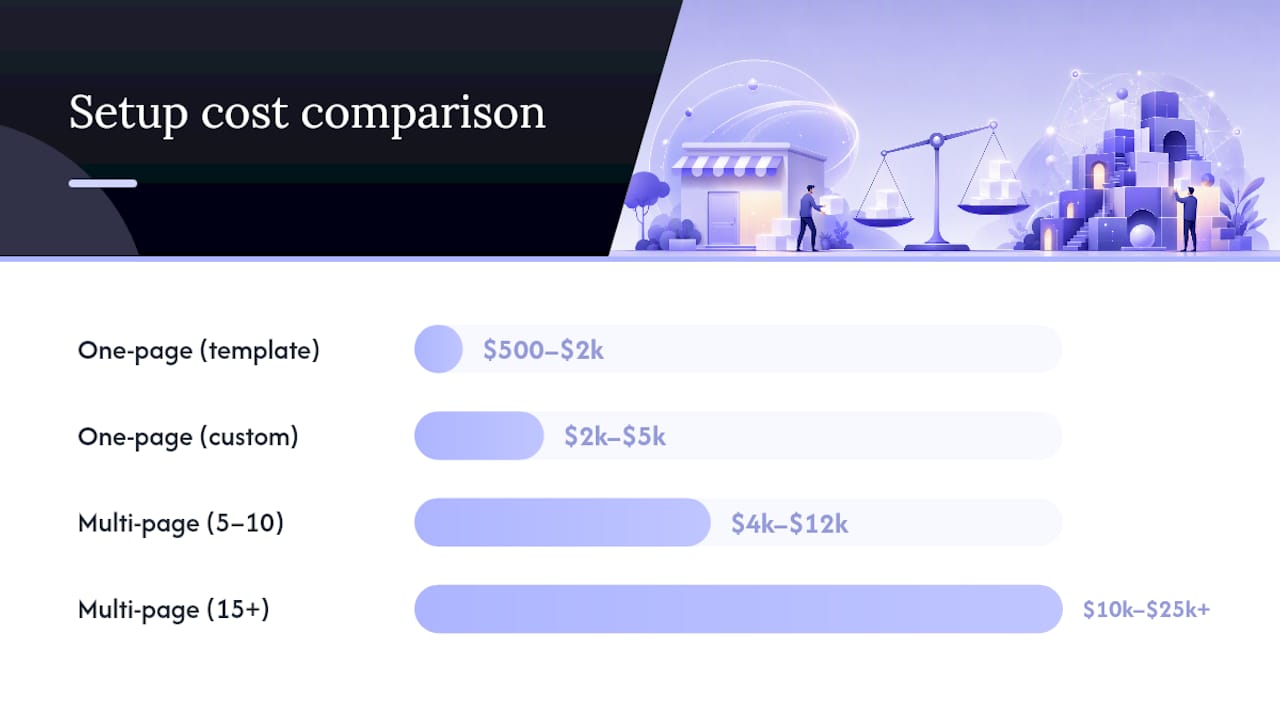
Rough cost and timeline bands for Canadian small businesses:
- One-page site (DIY/template): $500–$2,000 CAD; 1–5 days.
- One-page site (custom design/build): $2,000–$5,000 CAD; 1–3 weeks.
- Multi-page site (5–10 pages, CMS): $4,000–$12,000 CAD; 4–10 weeks.
- Multi-page site (15+ pages, blog, local SEO): $10,000–$25,000+ CAD; 2–5 months.
Ongoing maintenance for a multi-page site tends to be higher than for a one-page site, reflecting the greater complexity of content and technical upkeep.
Understanding business scalability signals helps here: if your business is growing faster than your current site can support, the cost of migration later usually exceeds the cost of building multi-page from the start.
When and how to scale from one-page to multi-page
Most businesses that start with a one-page site eventually outgrow it. The question is when to make the move and how to do it without losing the rankings and traffic you have built.
Signals it is time to migrate:
- You are targeting more than two or three distinct keywords and organic traffic has plateaued.
- Visitors are arriving with different intents (some want pricing, some want a specific service, some want your blog) and a single scroll page cannot serve them all well.
- You want to launch a blog, a resources section, or separate location pages.
- Your Google Search Console data shows impressions for queries your current page cannot rank for because the content does not exist.
- You are losing leads to competitors who have deeper, more informative sites.
Migration checklist:
- Keyword mapping: Assign one primary keyword to each new page before writing any content.
- Redirect plan: If any existing URLs change, set up 301 redirects immediately. For a one-page site, the main risk is anchor links that external sites may have referenced.
- Canonical strategy: Set canonical tags on every new page to prevent duplicate content, especially on location pages.
- Staging environment: Build and test the new site on a staging domain before going live. Never migrate directly on the live URL.
- Analytics migration: If you are moving from Universal Analytics to GA4 (or already on GA4), rebuild your event tracking and conversion goals on the new page structure. Update your GTM container to reflect new page paths.
- Post-launch monitoring: Watch Google Search Console for crawl errors, index coverage drops, and ranking changes for your primary keywords for at least 60 days after launch.
Priority order for new pages: Start with your highest-revenue service pages, then add location pages if you serve multiple areas, then launch a blog once the core pages are indexed and ranking. Trying to build everything at once usually means nothing gets done well.
Planning keyword mapping, redirects, and canonical strategy upfront reduces the technical and SEO cost of migration significantly. Businesses that skip this step often see a temporary ranking drop that takes months to recover from.
Canada-specific considerations for your website decision
Canadian small businesses face a few operational realities that affect this choice directly.
Local search and Google Business Profile:
Your Google Business Profile (GBP) is often the first thing a local customer sees, and it links to your website. Whether you have one page or twenty, your GBP listing must have a consistent name, address, and phone number (NAP) that exactly matches what appears on your site. Inconsistencies between your GBP and your website confuse Google’s local ranking algorithm and reduce your visibility in the local pack.
For businesses serving multiple cities or neighbourhoods, a multi-page site with dedicated location pages (e.g., /plumber-ottawa, /plumber-gatineau) gives you a significant local SEO advantage. A one-page site cannot support this without becoming unwieldy.
Bilingual UX:
If your business operates in both English and French, a multi-page site with a proper language structure is the right call. Options include:
- Subdirectories:
example.com/en/andexample.com/fr/(recommended for most small businesses). - Subdomains:
en.example.comandfr.example.com(more complex to manage). - Separate domains:
example.comandexample.ca/fr/(rarely necessary for small businesses).
A bilingual one-page site is possible but creates a long, unwieldy page that is hard to maintain and harder to optimise for two sets of keywords. Use hreflang tags to tell search engines which version to serve to which audience.
Privacy and consent:
Canada’s Personal Information Protection and Electronic Documents Act (PIPEDA) requires that you obtain meaningful consent before collecting personal data through analytics tools like GA4 or GTM. A cookie consent banner is not optional if you are tracking Canadian visitors. This applies equally to one-page and multi-page sites.
Pro Tip: A practical hybrid for Canadian local businesses: build a high-converting one-page front door for your primary service and city, then add a lightweight multi-page backend with a blog and separate location pages as you grow. You get fast time-to-market and a clear path to local SEO depth without rebuilding from scratch.
A practical perspective on choosing the right format
The debate between one-page and multi-page sites often gets framed as a technical question, but the real issue is strategic clarity. Most small businesses that struggle with their website do not have a format problem. They have a goals problem.
A one-page site forces discipline. You cannot hide behind a sprawling navigation menu or a blog that nobody reads. Every word has to earn its place, and the conversion path has to be obvious. That constraint is actually a feature for businesses that know exactly who they serve and what they want visitors to do.
Multi-page sites, on the other hand, reward patience. The SEO benefits are real, but they compound slowly. A business that launches a multi-page site and publishes two blog posts a year will not see meaningful organic growth. The format only pays off when paired with a genuine content commitment.
What tends to work well in practice is the hybrid approach: a focused, fast one-page site as the primary marketing front door, backed by a growing set of service and location pages that build organic reach over time. This is not a compromise. It is a sequenced strategy. Start where you can execute well, then expand when the business signals it is ready.
A one-page site is a useful tool or placeholder, but it is not a substitute for a content-rich multi-page strategy when long-term organic growth is the objective. The businesses that treat it as a permanent solution tend to find themselves rebuilding in two years anyway, usually under more pressure and with less planning time than if they had mapped the migration from the start.
What Tech Business Development can do for your site
Deciding between a one-page and a multi-page site is one thing. Building it correctly, tracking it properly, and making sure it shows up in local search is another. Tech Business Development handles the full stack for Canadian small businesses: website design and development, Google Business Profile setup, GA4 and GTM implementation, and SEO, all under one roof at rates built for independent operators, not enterprise budgets.

Whether you need a focused one-page site live in a week, a CMS-backed multi-page build with local landing pages, or a migration from an existing site with zero ranking loss, the team at Tech Business Development manages it end to end. Services include:
- One-page and multi-page website design and development.
- Domain, hosting, and CMS setup handled internally.
- Google Business Profile, GA4, GTM, and AdWords configuration.
- Local SEO and bilingual site structure for Canadian markets.
- Site migrations with keyword mapping, redirects, and post-launch monitoring.
Get in touch with Tech Business Development to discuss which format fits your goals and get a realistic quote for your project.
Sources
Recommended